Your own store and your first ads, built step by step on the real screens
Where you are
Ira's media plan is signed. Now it is your turn. Many of you already have a product, a supplier rate and your first stock.
The goal
A store that can take an order, three ads live at ₹1,000 a day, and a one-page results report.
The money
Your ad budget of ₹3,000 to ₹5,000. Everything bigger in Part 4 uses a practice account.
The rule
Hands first. Every step shows the real Shopify or Meta screen with numbered callouts. A ChatGPT prompt sits beside it for when you are stuck.
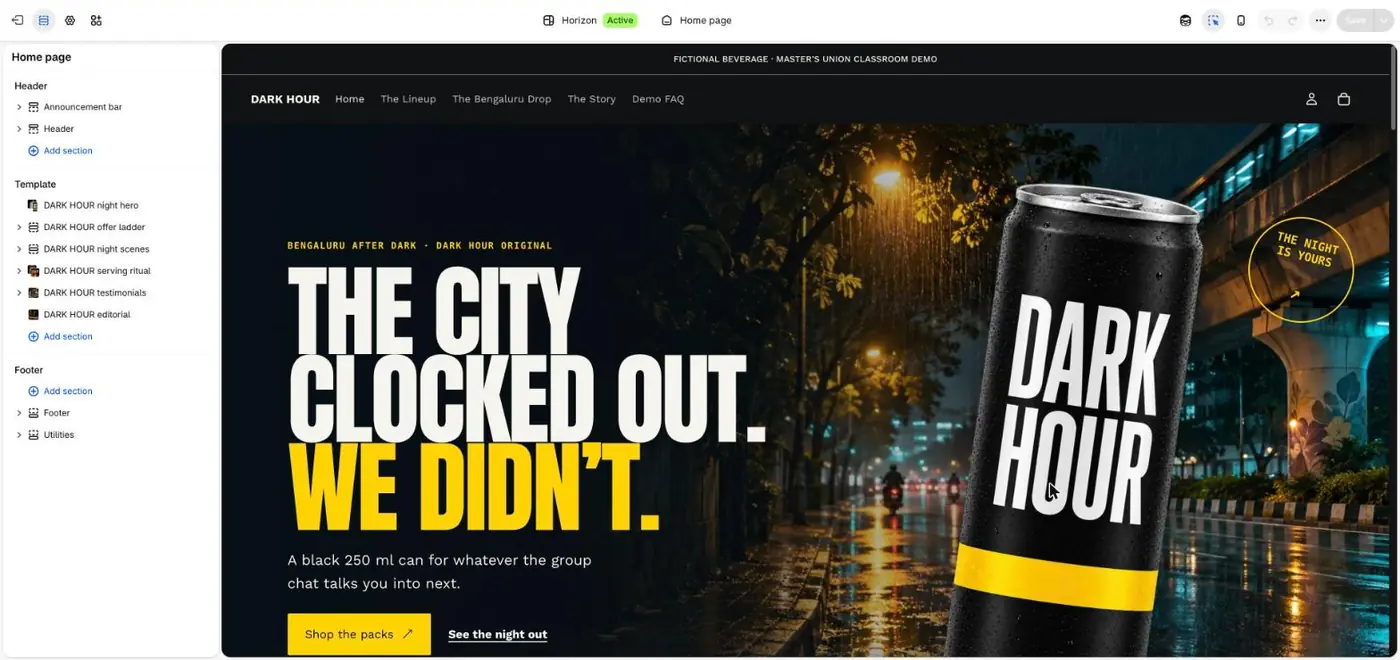
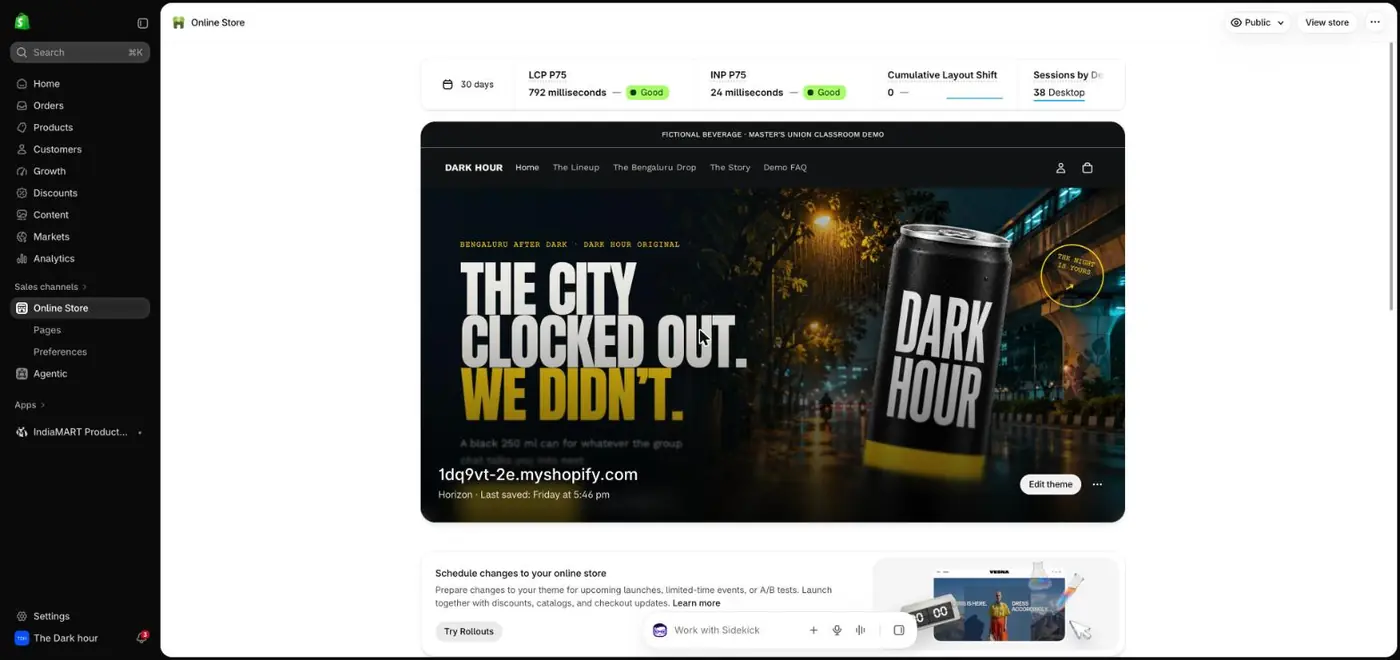
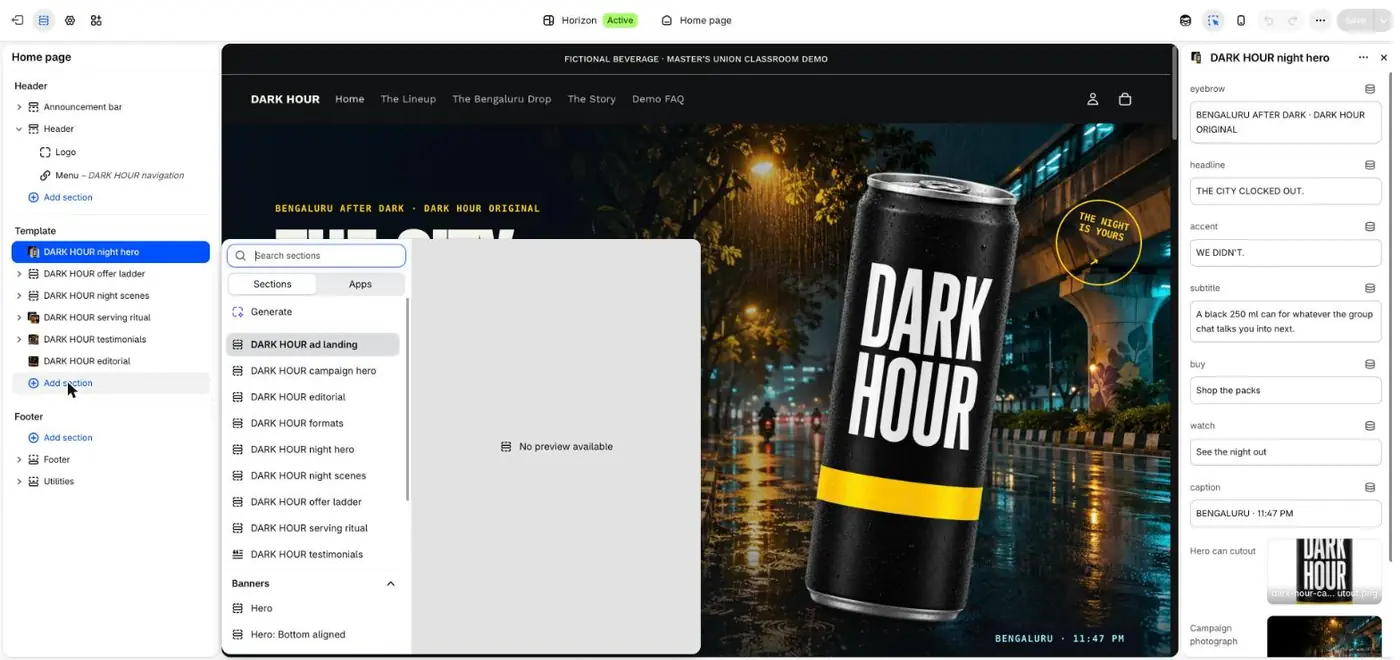
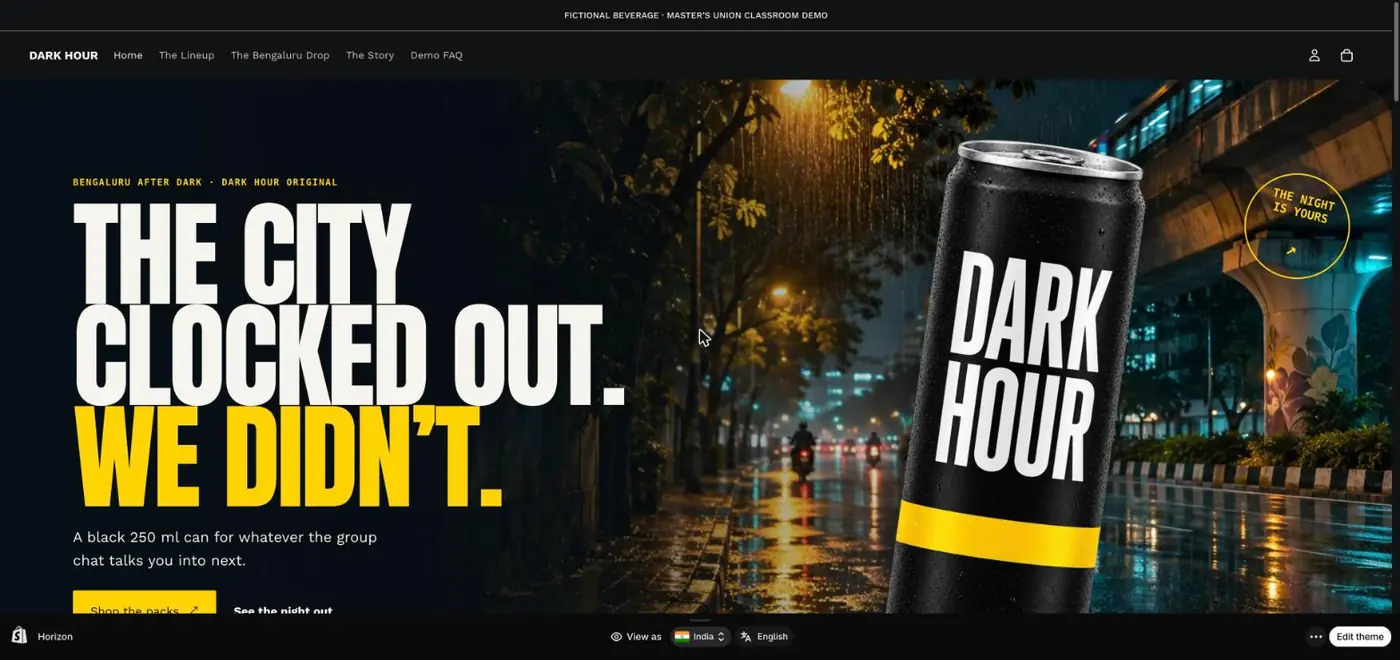
The Dark Hour store, built for this class on Shopify. Every screen in this lab comes from building it.
What the curriculum says you will be able to do
Session 4Learn the foundational elements of campaign planning, including platform setup, goal setting, and the RACE framework.
Session 5Understand audience psychology, need states, and how to build and target audiences for dropshipping using Meta platforms.
Session 6Learn how to measure, attribute, and optimize campaign performance using analytics and e-commerce metrics.
The four parts, and what you will be able to do after each
The tools you will use
ShopifyRazorpayFacebook Page + Instagram professional accountMeta Ads ManagerMeta Ad LibraryChatGPT + Shopify pluginApify (optional)Instagram Edits or Canva for creatives
Personal details, account notices and other campaigns in these screenshots are blurred. Shopify plans and billing follow Masters' Union's instructions and are not covered here.
Part 1 · Session 3, second half
Set up a store that could take a real order today
You have a product and a supplier. In this part you turn an empty Shopify account into a store with your details, payments, a first product and stock, and you connect it to ChatGPT. Every step shows the real screen first.
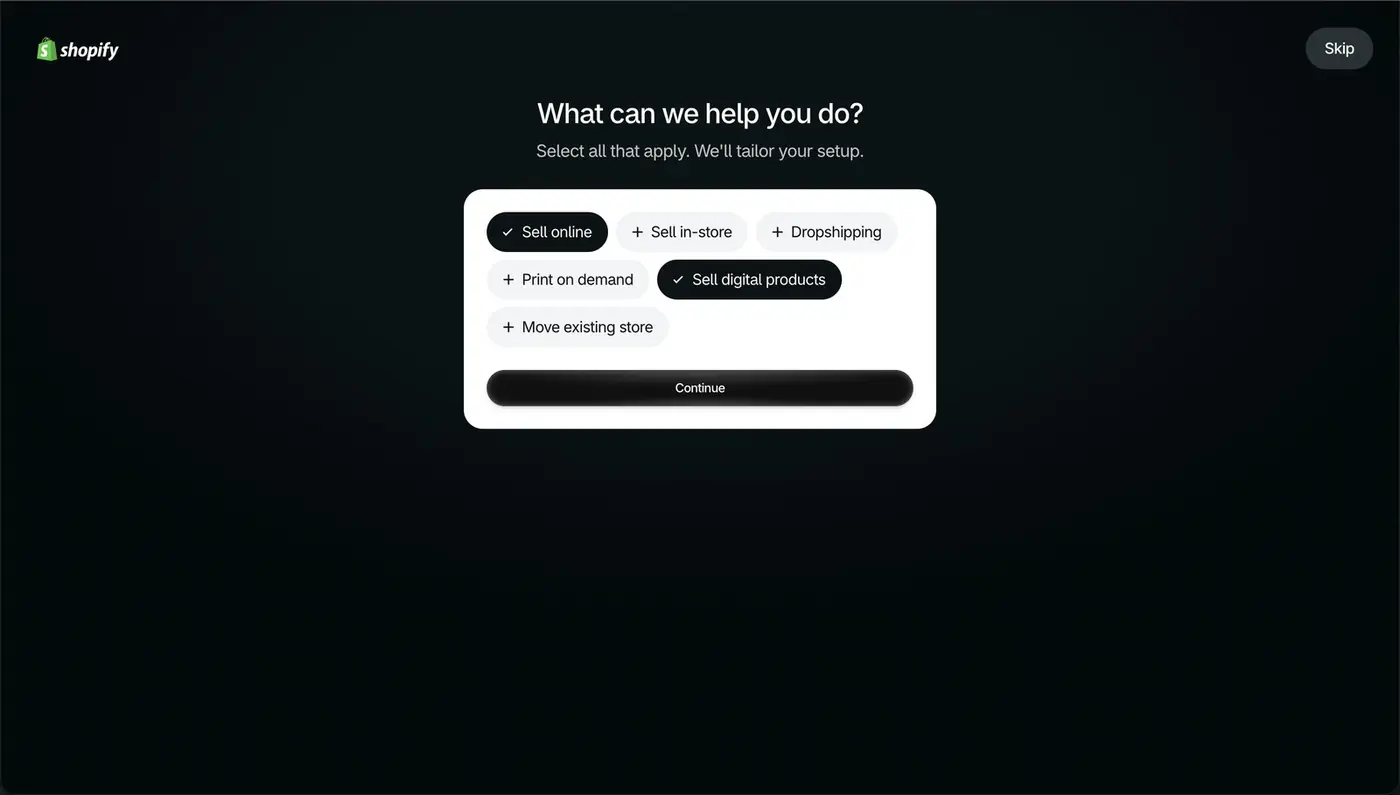
Step 1Sign up → What can we help you do?
Tell Shopify what you sell, then follow Masters' Union for the plan
12
The first question after sign-up
1Select Sell online. Leave Sell digital products off unless you sell downloads, because that answer changes the setup cards Shopify shows you next.
2Press Continue. If a plan or billing screen appears, follow the instruction Masters' Union gives for your account.
Why it mattersShopify shapes your dashboard around this answer, so a wrong pick sends you to the wrong setup steps.
Step 2Shopify admin → Home
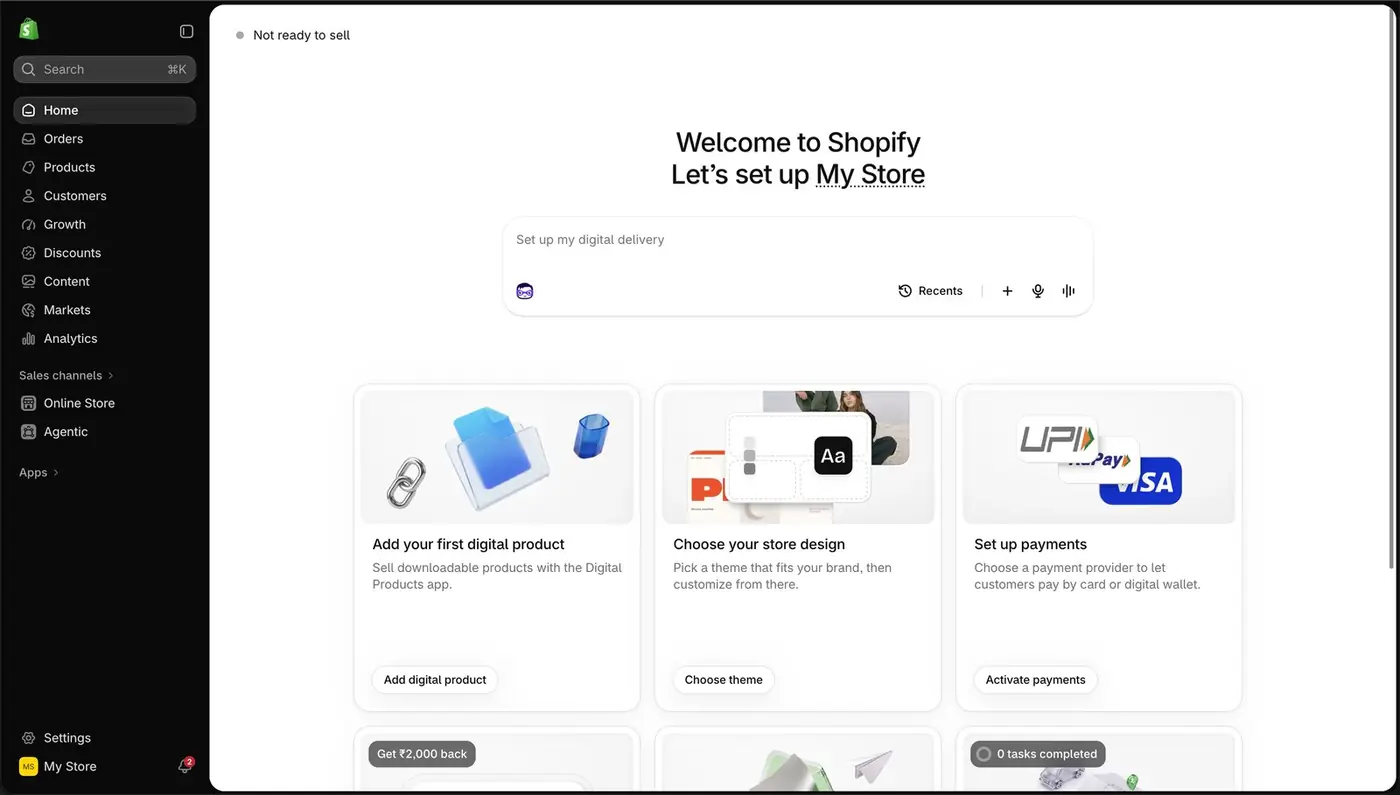
Learn the five places on the dashboard before you click anything
12345
The admin home of a new store
1The left sidebar is your map. Products, Orders and Customers are where daily work happens.
2The setup cards give you Shopify's recommended order: design, payments, products.
3Activate payments sits here too. You will do it in step 4.
4Settings, bottom left, holds store details, payments, shipping and policies.
5The bar in the middle is Sidekick, Shopify's AI assistant inside your admin. Ask it setup questions in plain English.
Why it mattersEvery later step in this Build Lab starts from one of these five places.
Step 3Settings → General
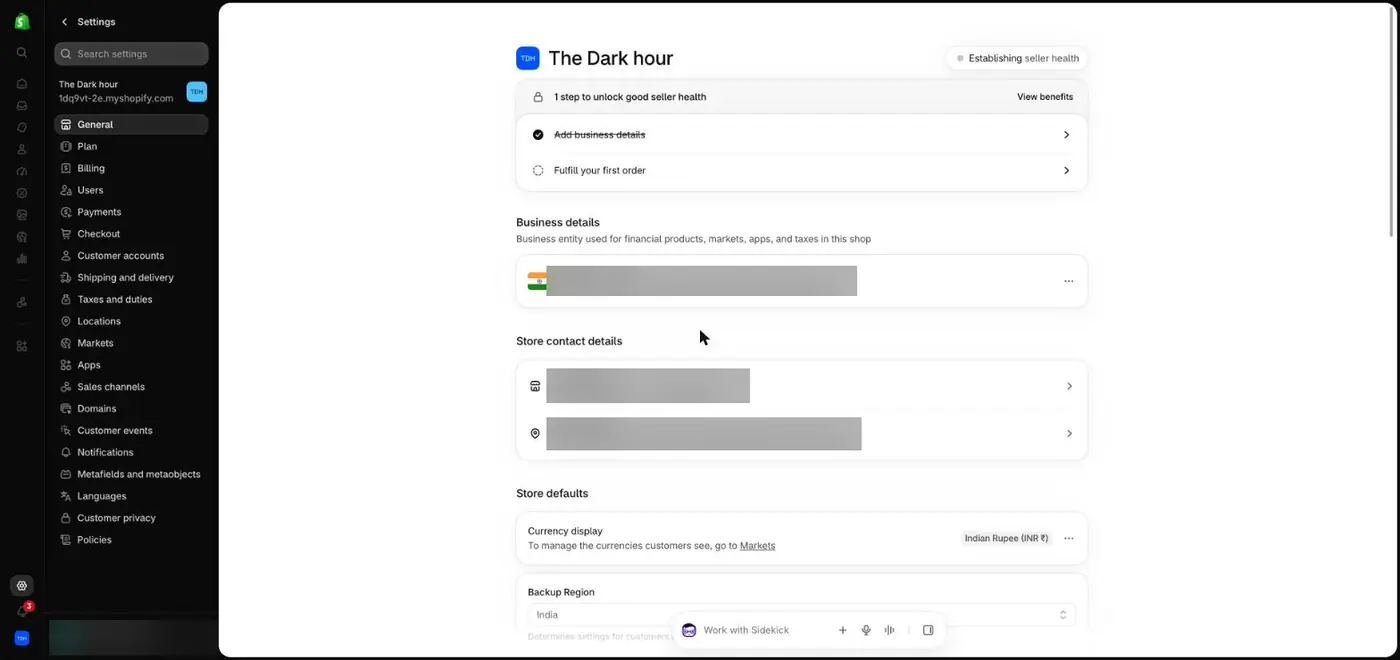
Fill in the store details that customers and Meta will check
1234
Store details on the Dark Hour store. Personal details are blurred.
1Set the store name customers will see. ChatGPT cannot rename a store, so this one is always done by hand.
2Add business details: who legally runs the store.
3Add a contact email and phone number you will actually answer. They appear on invoices and in your policies.
4Keep the currency as Indian Rupee (INR) and the timezone as India.
Why it mattersMeta reviews the website behind every ad. A store with no contact details looks unsafe to Meta and to buyers.
ChatGPT laneFill the [brackets], paste into ChatGPT
Step 4Settings → Payments → Choose a provider
Switch on payments with Razorpay, and keep test mode on while you practise
4567
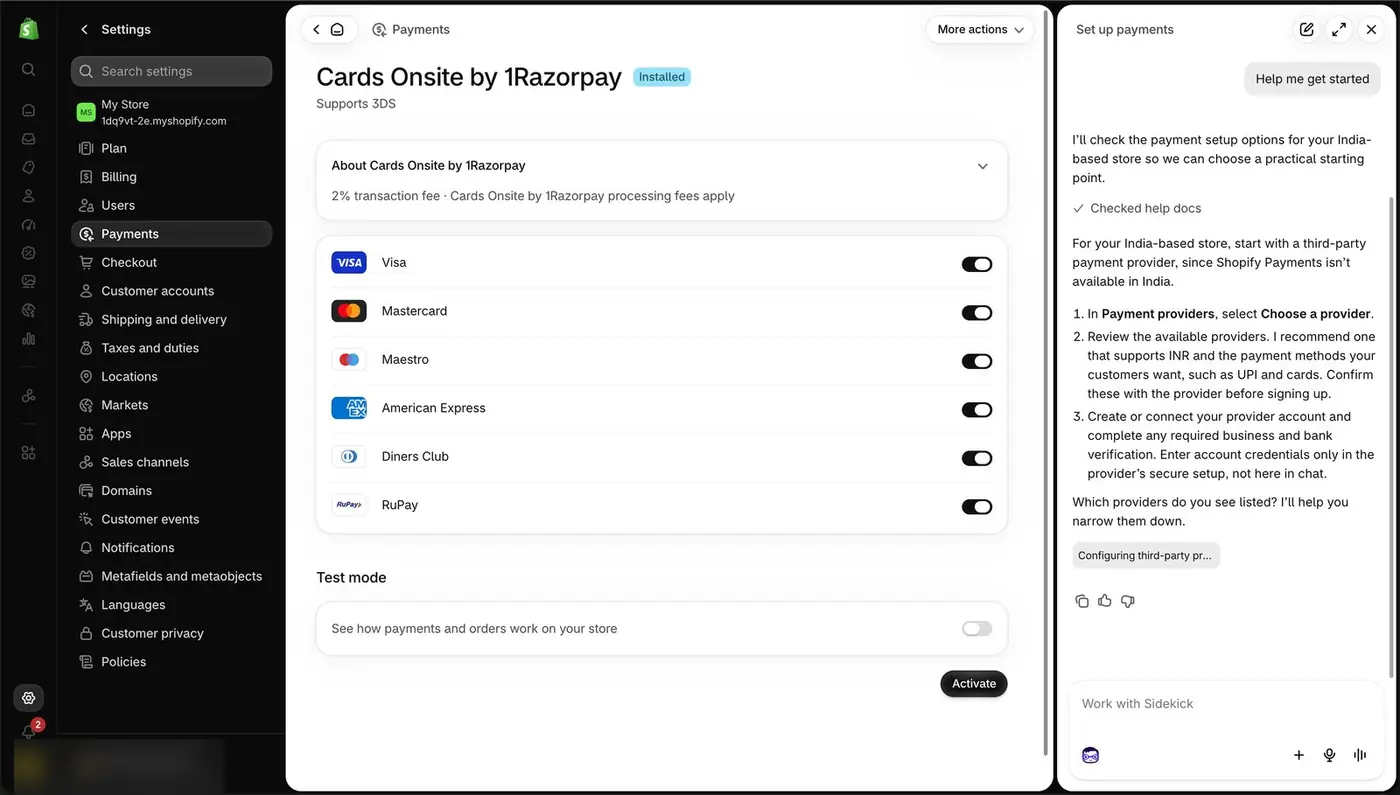
Card networks, test mode and Activate
12
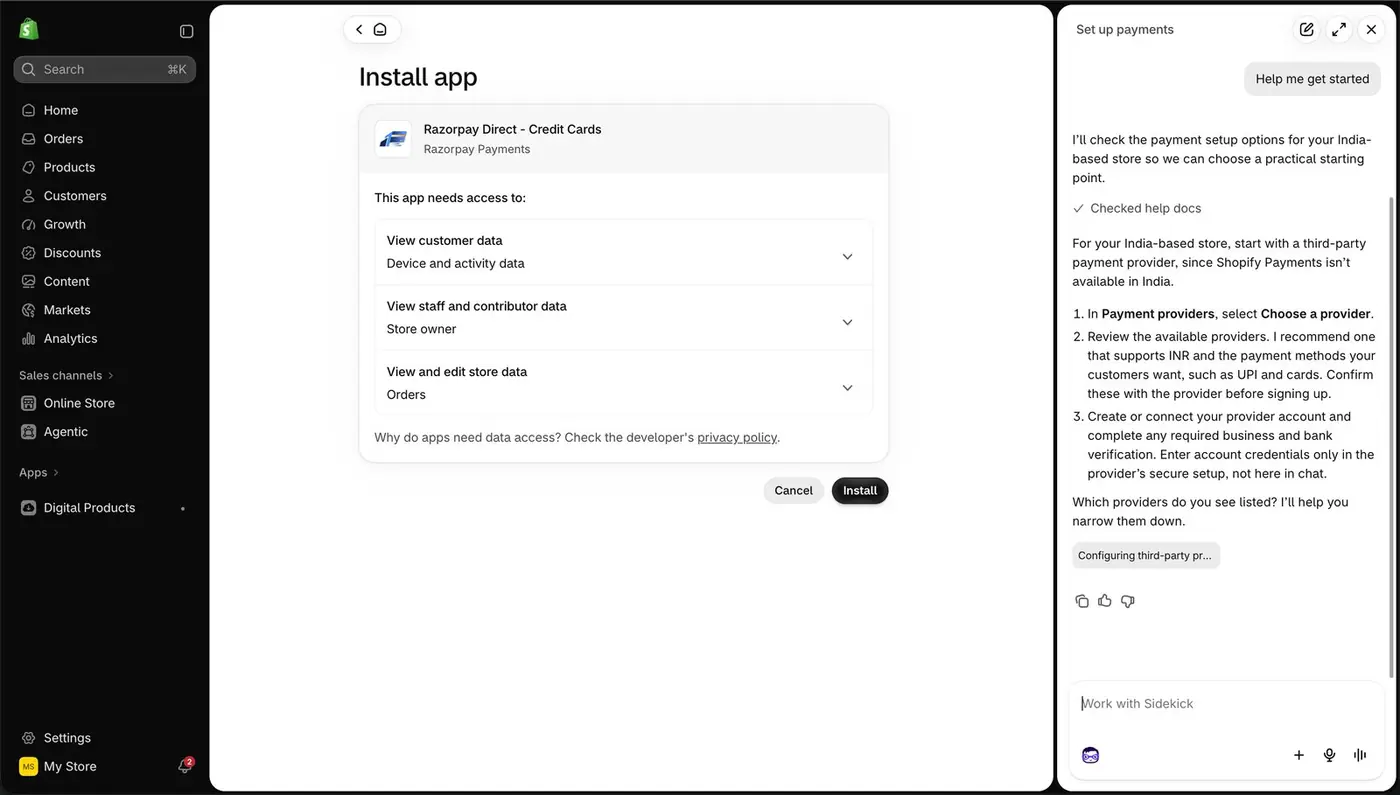
Installing the Razorpay app
3
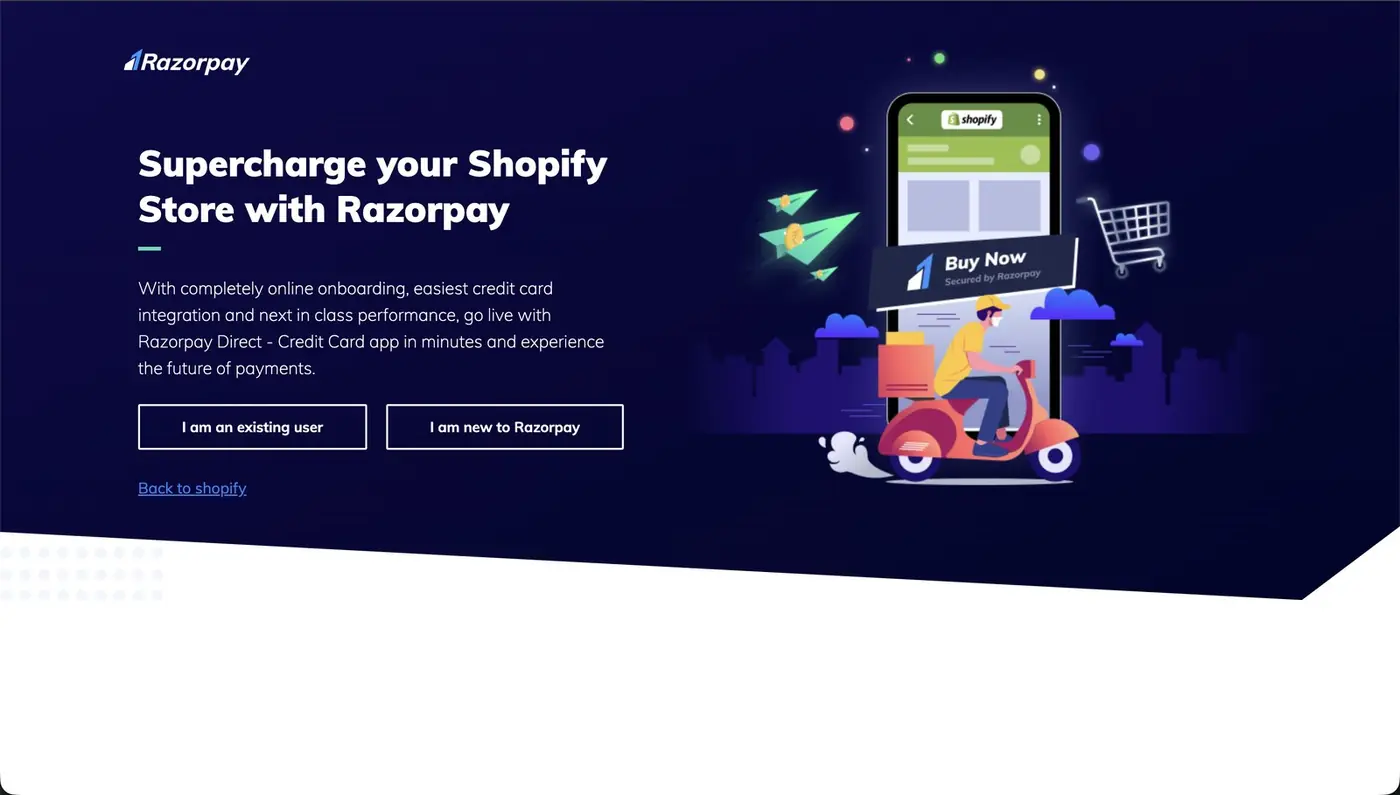
Razorpay's own onboarding page
1Shopify Payments is not available for stores in India, so you pick a third-party provider. Razorpay is the common choice.
2Install the Razorpay app and approve the access it asks for.
3On Razorpay's page choose I am new to Razorpay, or log in. KYC and bank details go on Razorpay's secure page, never into a chat with an AI.
4Back in Shopify, Razorpay shows as installed.
5Turn on the card networks you want to accept.
6Turn on Test mode while you practise, so you can place orders without real money.
7Press Activate. Remember to turn test mode off before real ads go live.
Why it mattersA store that cannot take money cannot be tested. Test mode lets you run one full order end to end before any ad spends a rupee.
ChatGPT laneFill the [brackets], paste into ChatGPT
Step 5Products → Add product
Add your first product the way a buyer reads it
234567
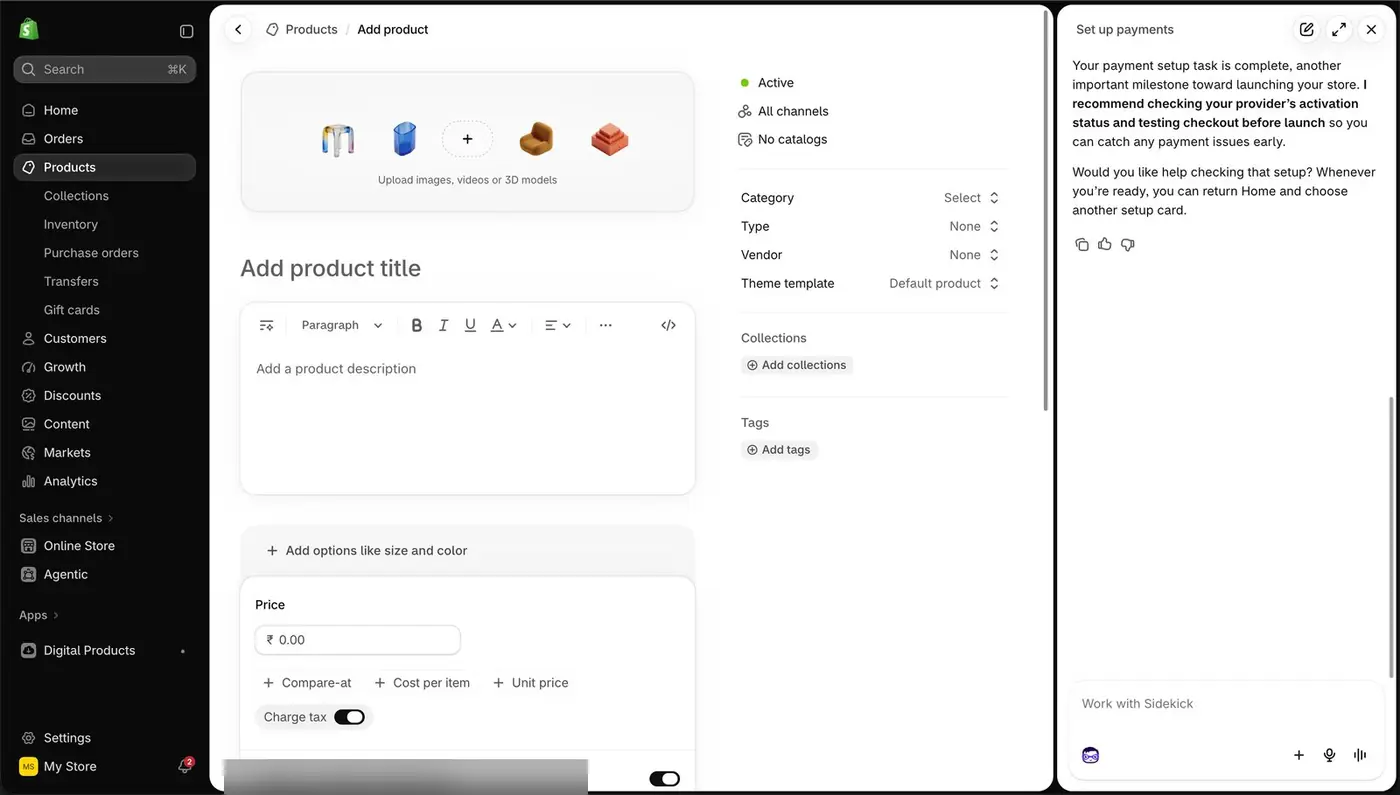
The product form
1
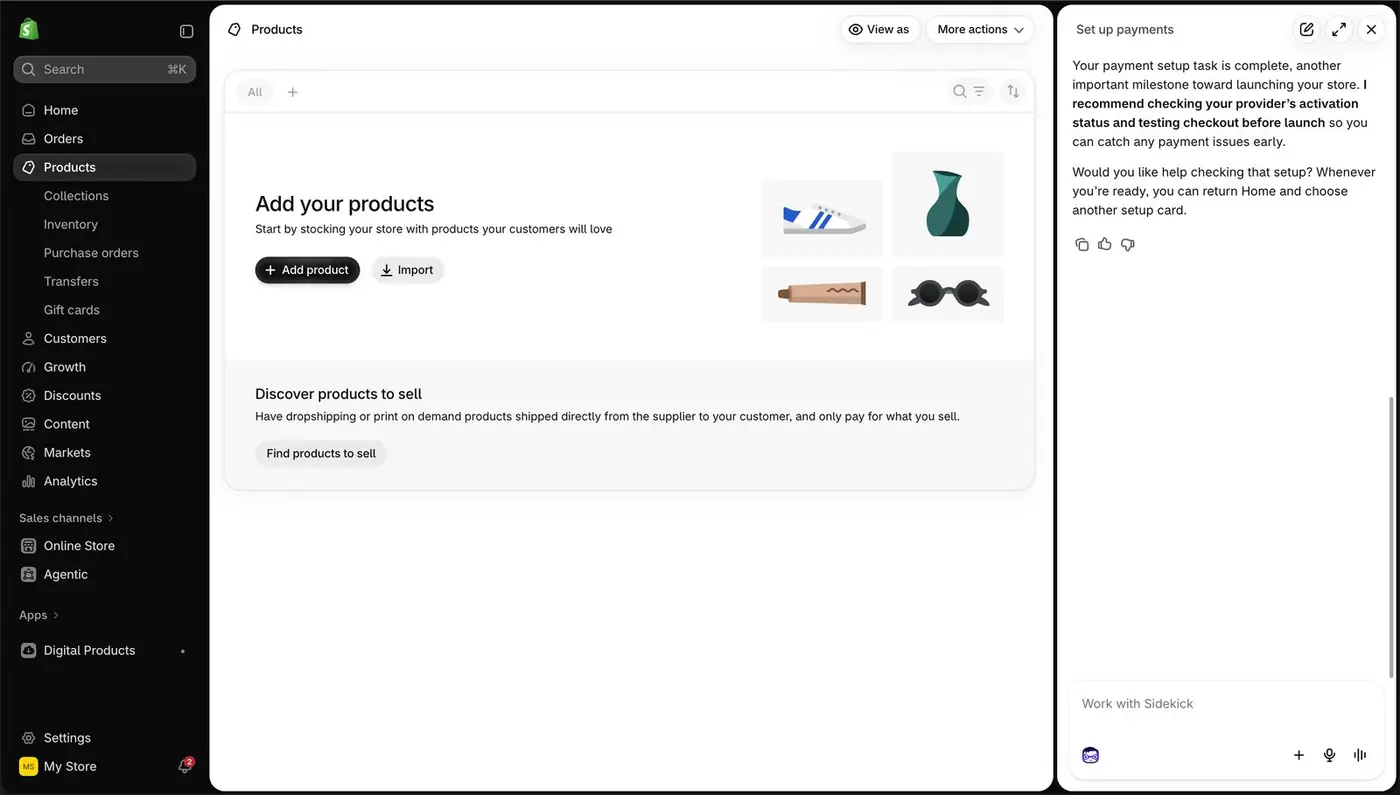
An empty catalogue
8
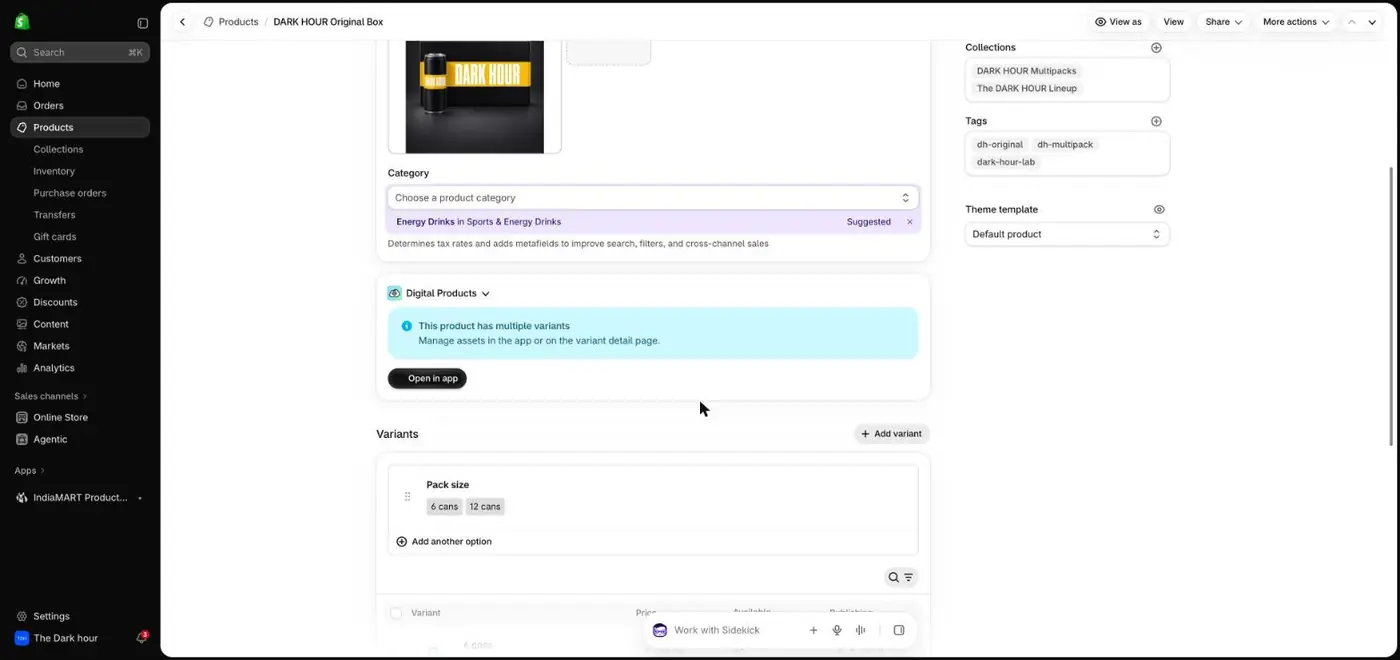
Dark Hour's pack sizes as variants
1Press Add product.
2Upload 4 to 6 photos. The first one appears in collections and in catalogue ads, so make it the cleanest.
3Write a title a buyer would search for: product, key detail, pack size.
4Write the description for one specific buyer: what it is, why it is better, what is in the box, how fast it arrives.
5Add options such as size or pack, so each choice gets its own price and stock.
6Enter the price. Compare-at shows a struck-out MRP. Use it only when the MRP is real.
7Add the product to a collection so it shows up on your homepage grid.
8Saved variants look like this: Dark Hour sells a 6-can and a 12-can box from one product page.
Why it mattersThe product page is where Ira lost 95 of every 100 visitors in Session 2. Photos, a clear price and a delivery promise decide whether a click becomes a cart.
ChatGPT laneFill the [brackets], paste into ChatGPT
Step 6OptionalProducts → Inventory → Import
Load stock in bulk with a CSV when you have many SKUs
123
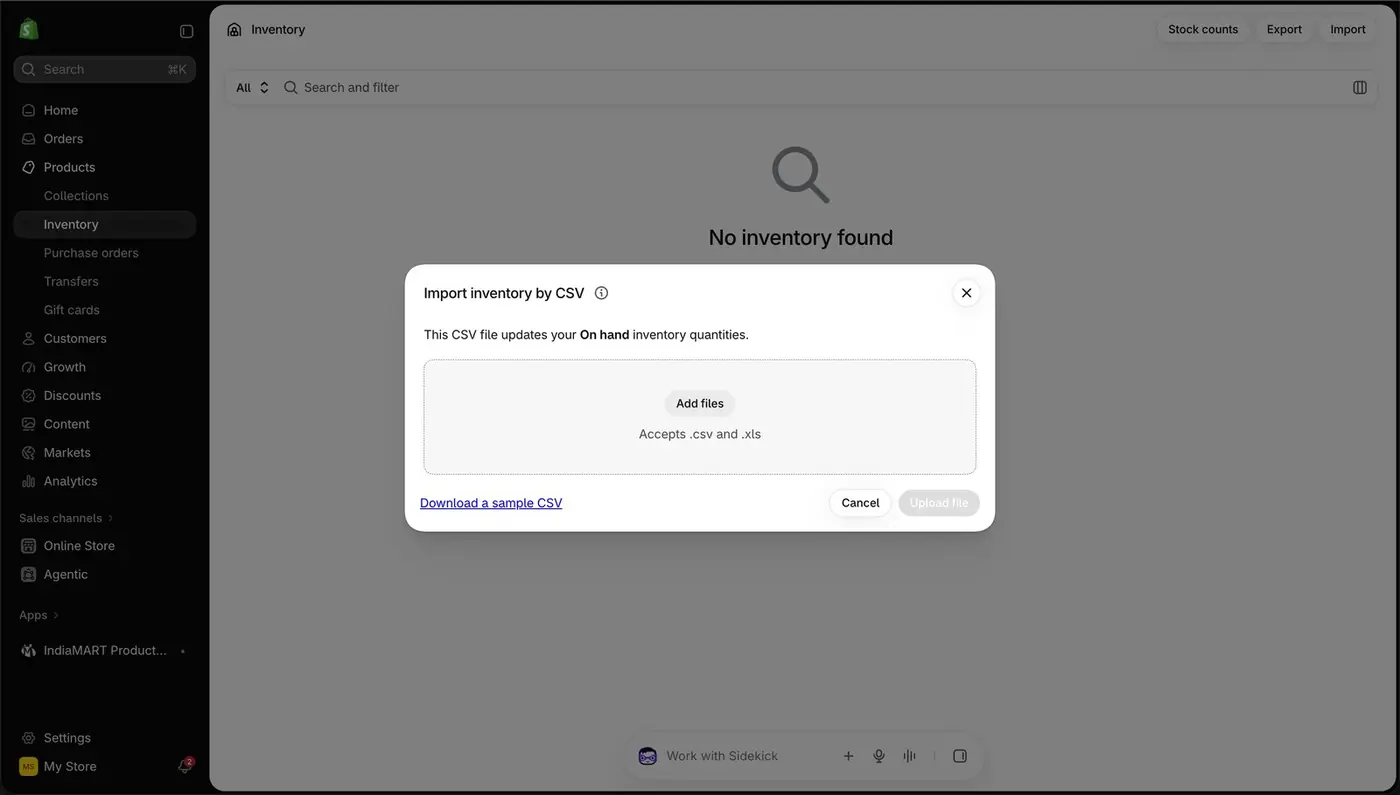
Import inventory by CSV
4
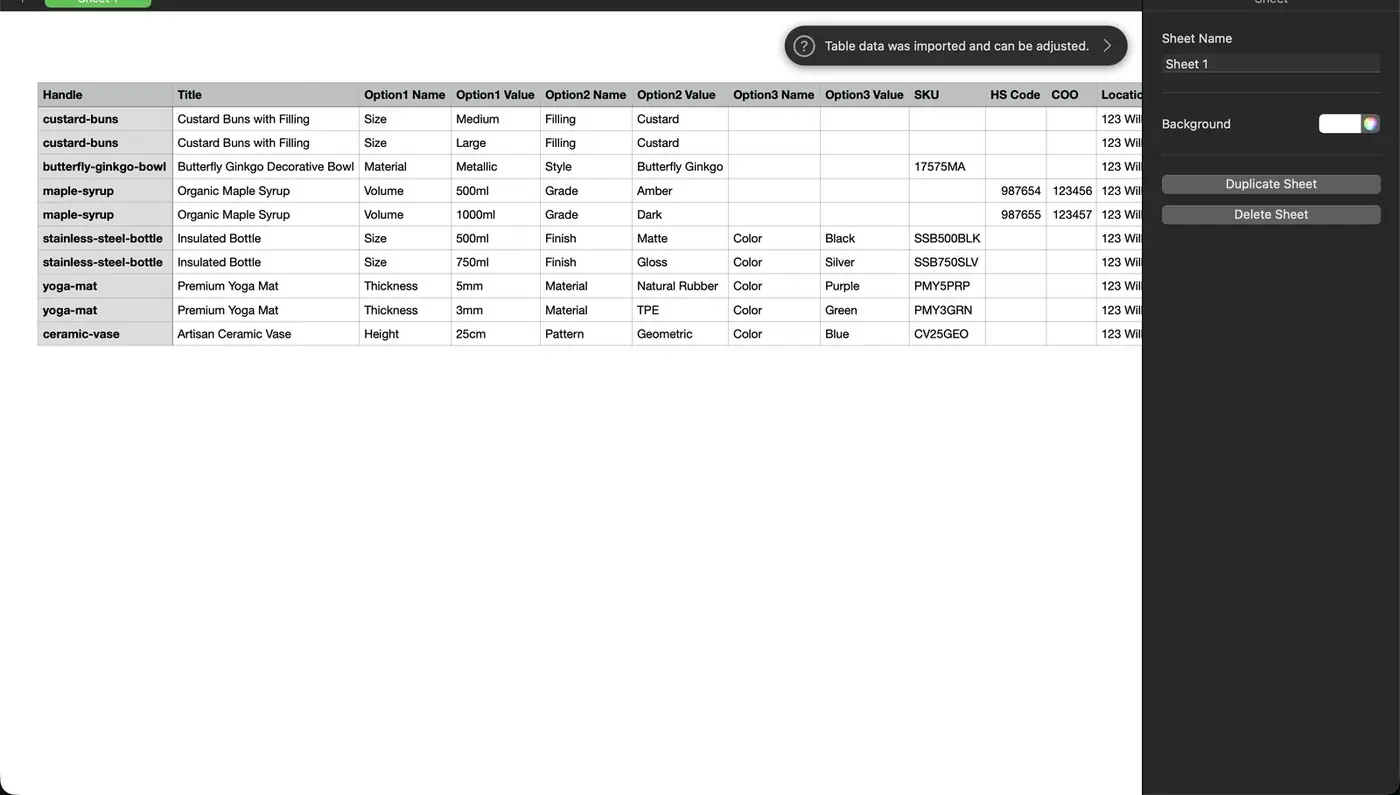
Shopify's sample CSV opened in a spreadsheet
1Open Inventory and press Import.
2Download the sample CSV first, so your columns match Shopify's exactly.
3Fill it in and add the file here.
4Each row is one variant: handle, title, option name and value, SKU and stock count.
Why it mattersIf you ordered 100 to 200 units, your stock count must be right. Otherwise an ad can sell units you do not have.
ChatGPT laneFill the [brackets], paste into ChatGPT
Step 7OptionalShopify App Store → IndiaMART Product Sourcing
Still sourcing? Compare suppliers without leaving Shopify
1
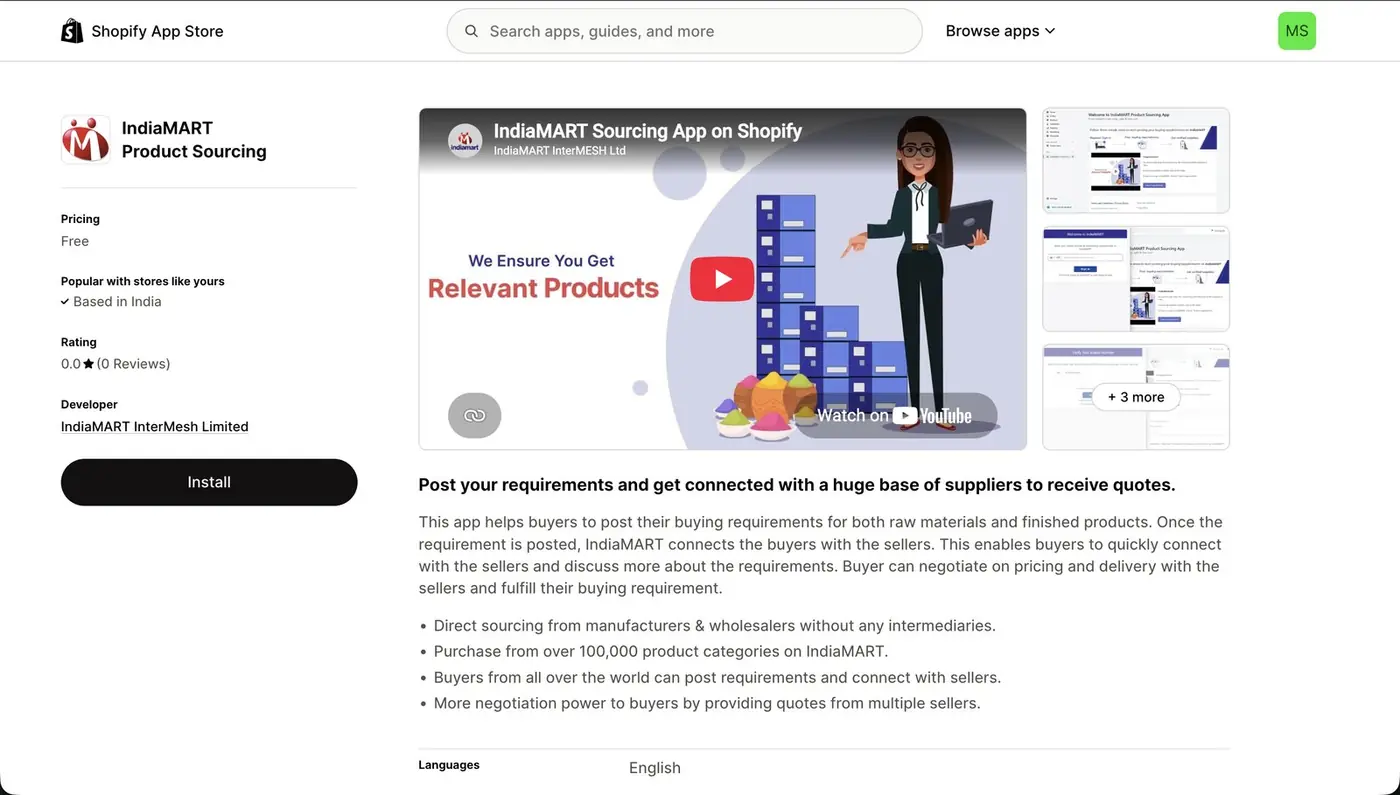
IndiaMART's app in the Shopify App Store
234
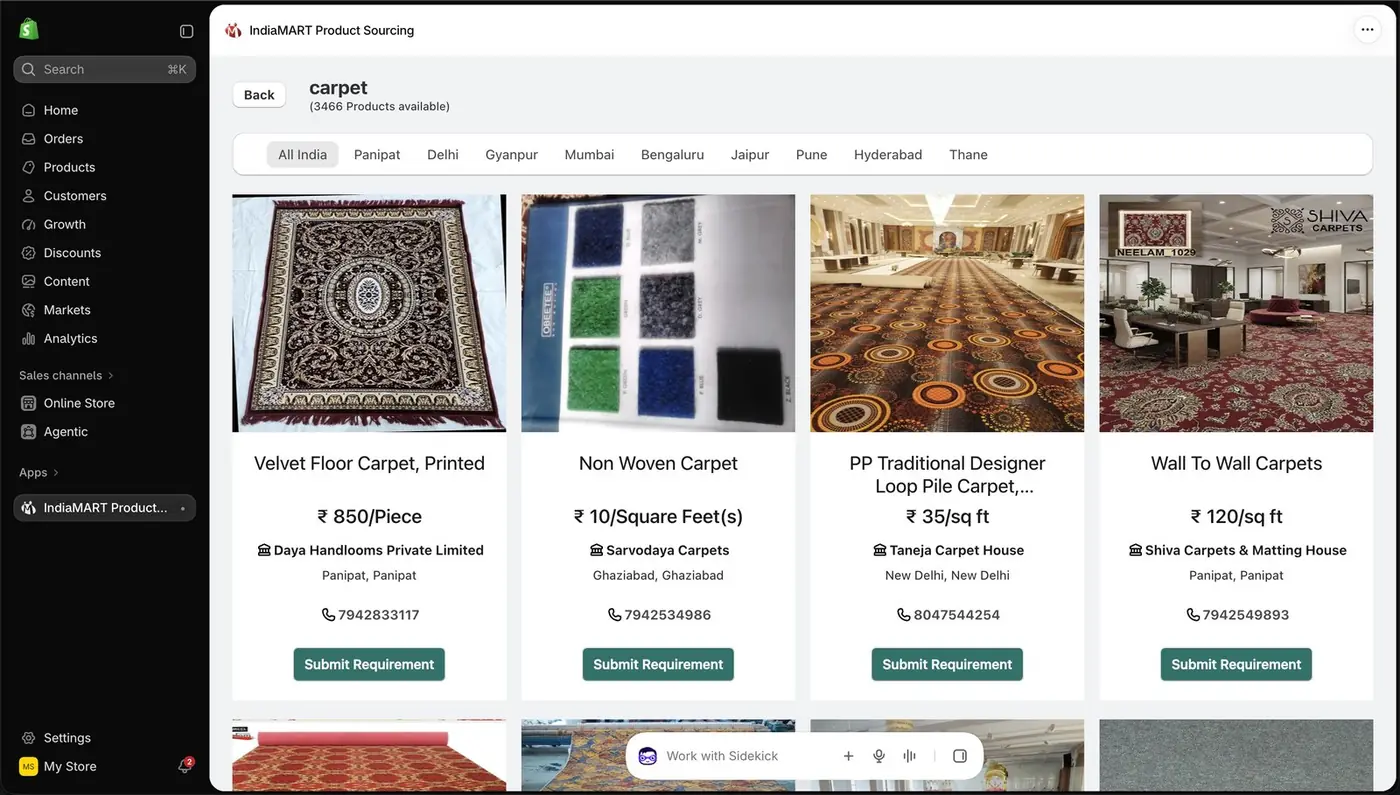
Supplier listings inside your admin
5
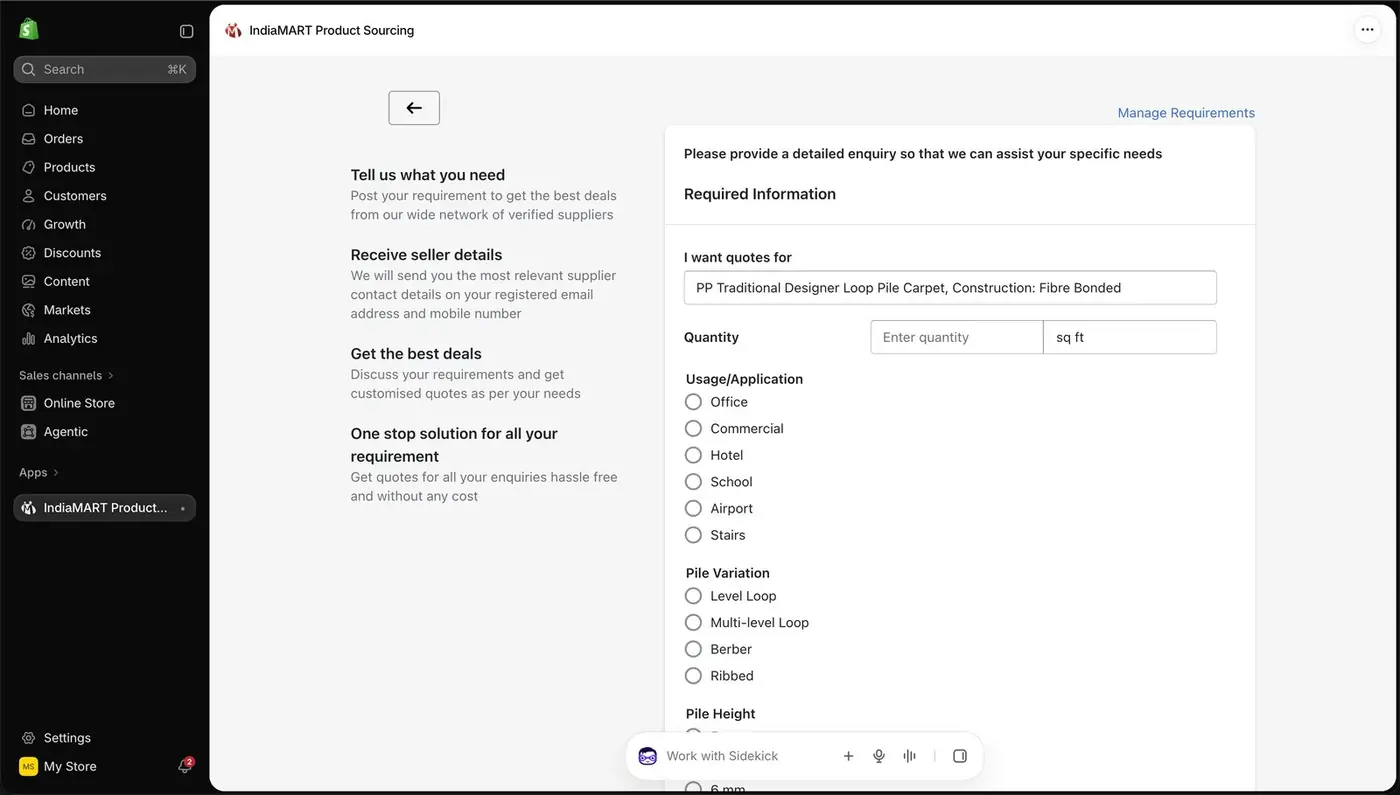
A quote request
1Install IndiaMART Product Sourcing from the Shopify App Store.
2Search your product and filter by city to find suppliers close to you.
3Compare the price per unit, the unit it is priced in and the supplier's city.
4Press Submit Requirement to ask several suppliers for a quote at once.
5Describe exactly what you want quoted: material, size and quantity.
Why it mattersYour landed cost per unit sets your break-even cost per order from Session 3. Twenty rupees per unit changes how much you can afford to pay Meta for each sale.
ChatGPT laneFill the [brackets], paste into ChatGPT
Step 8ChatGPT → Plugins → Shopify
The ChatGPT lane: connect your store to ChatGPT in seven clicks
12
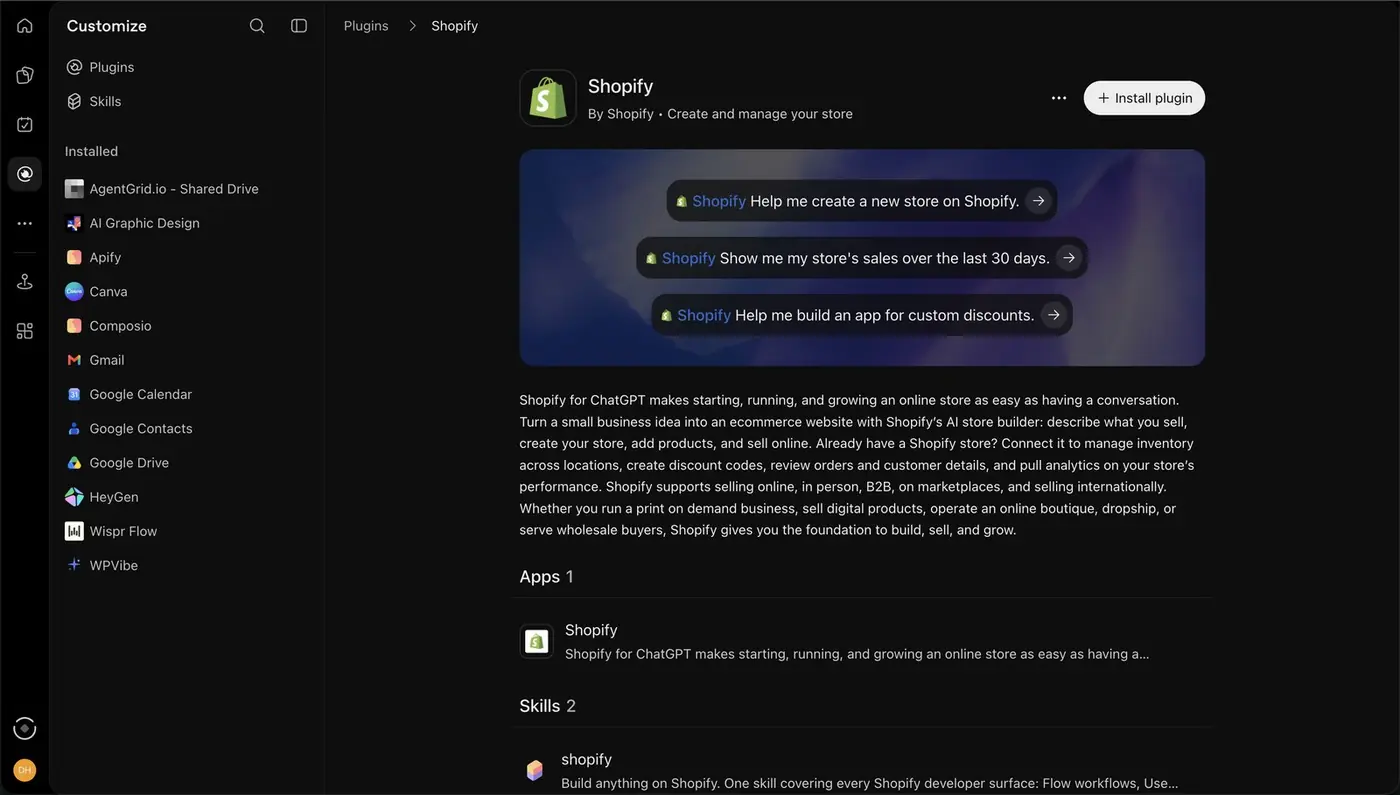
The Shopify plugin page in ChatGPT
3
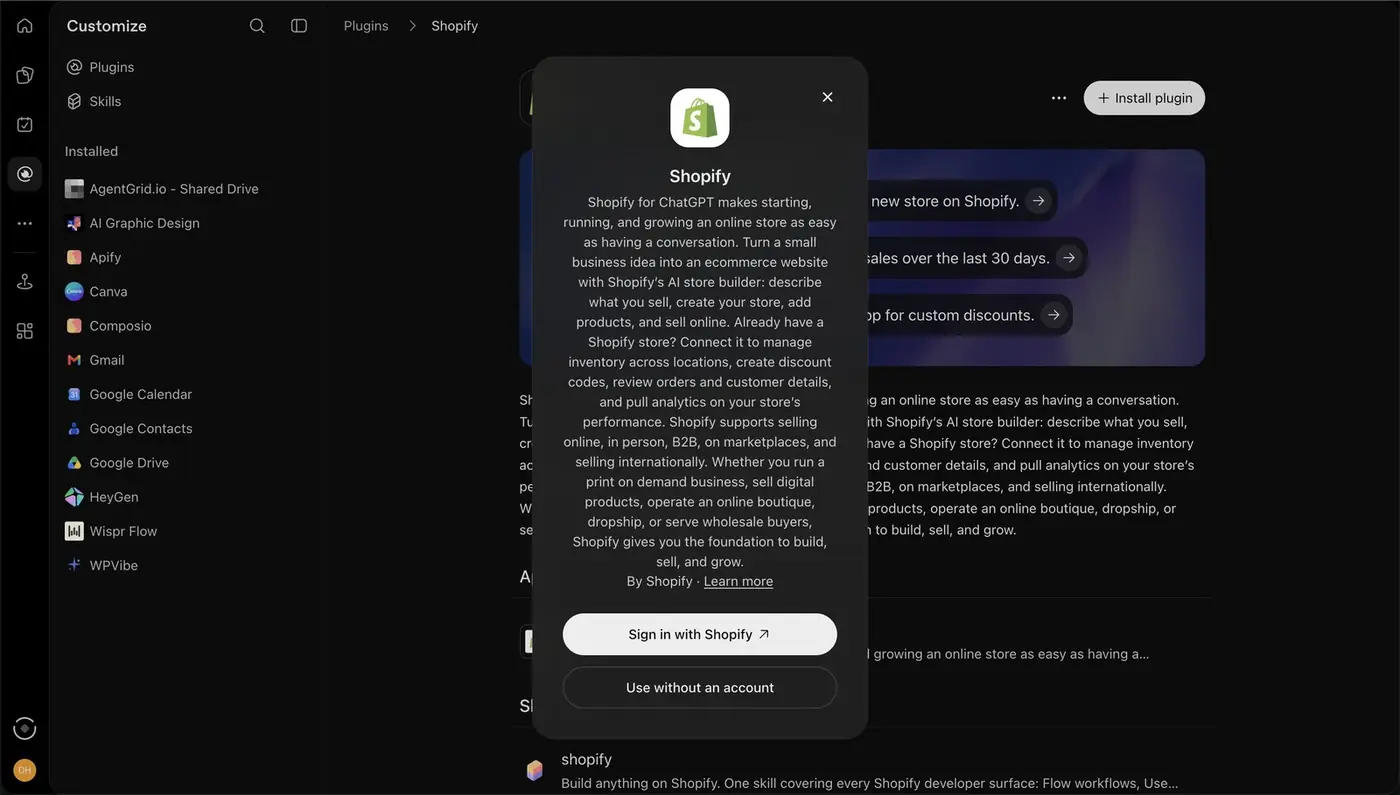
Sign in
4
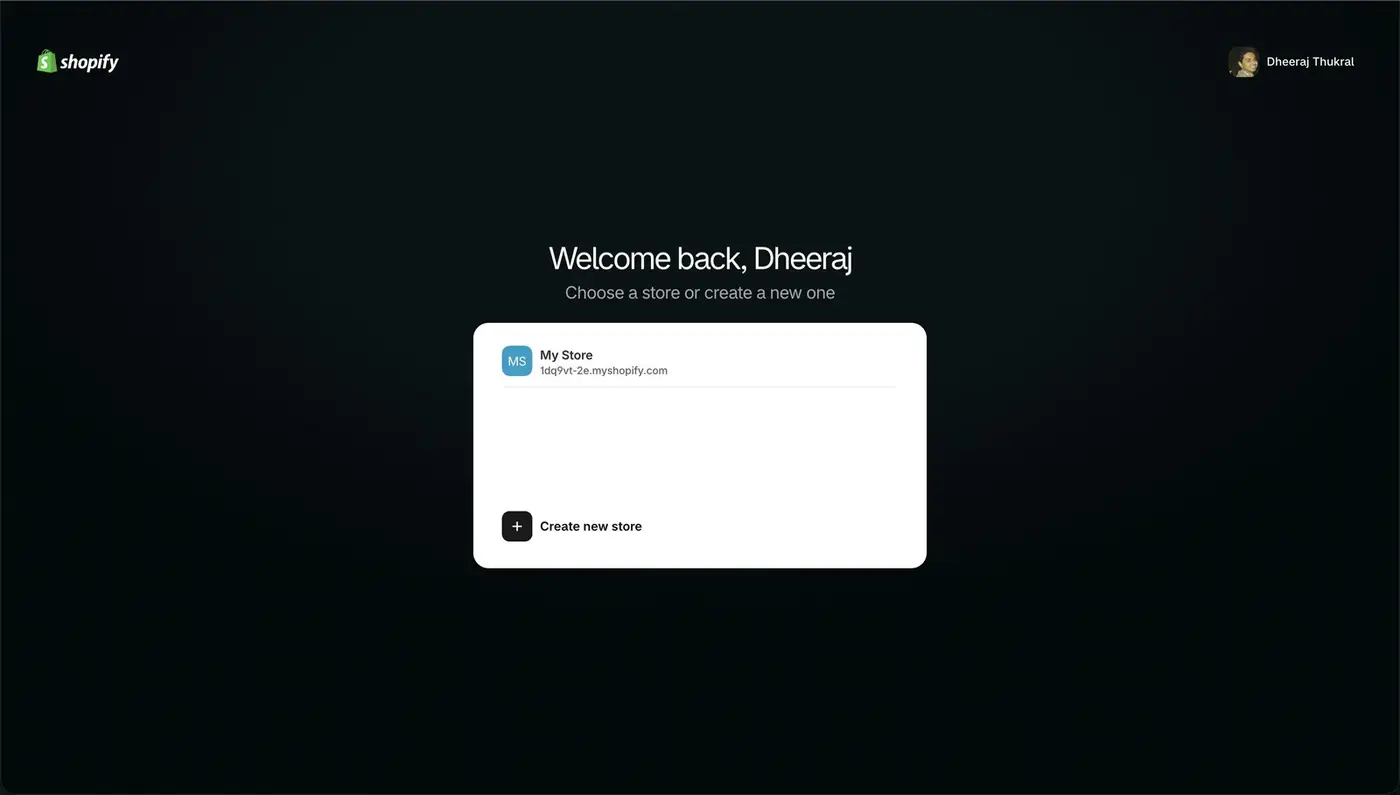
Choose the store
56
Approve the app inside Shopify
7
Connected
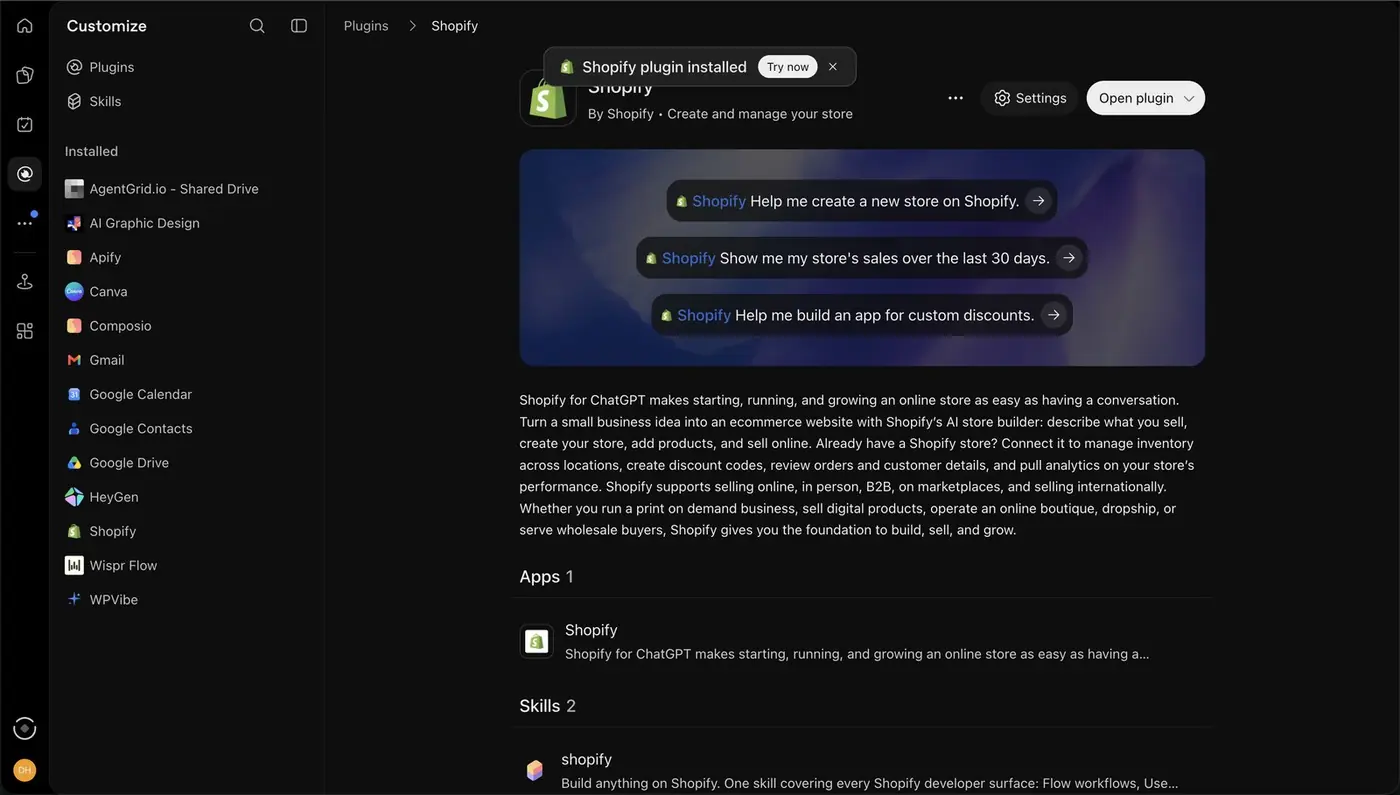
1In ChatGPT open Plugins, search Shopify and press Install plugin.
2These are examples of what you can ask once it is connected.
3Choose Sign in with Shopify.
4Pick your store.
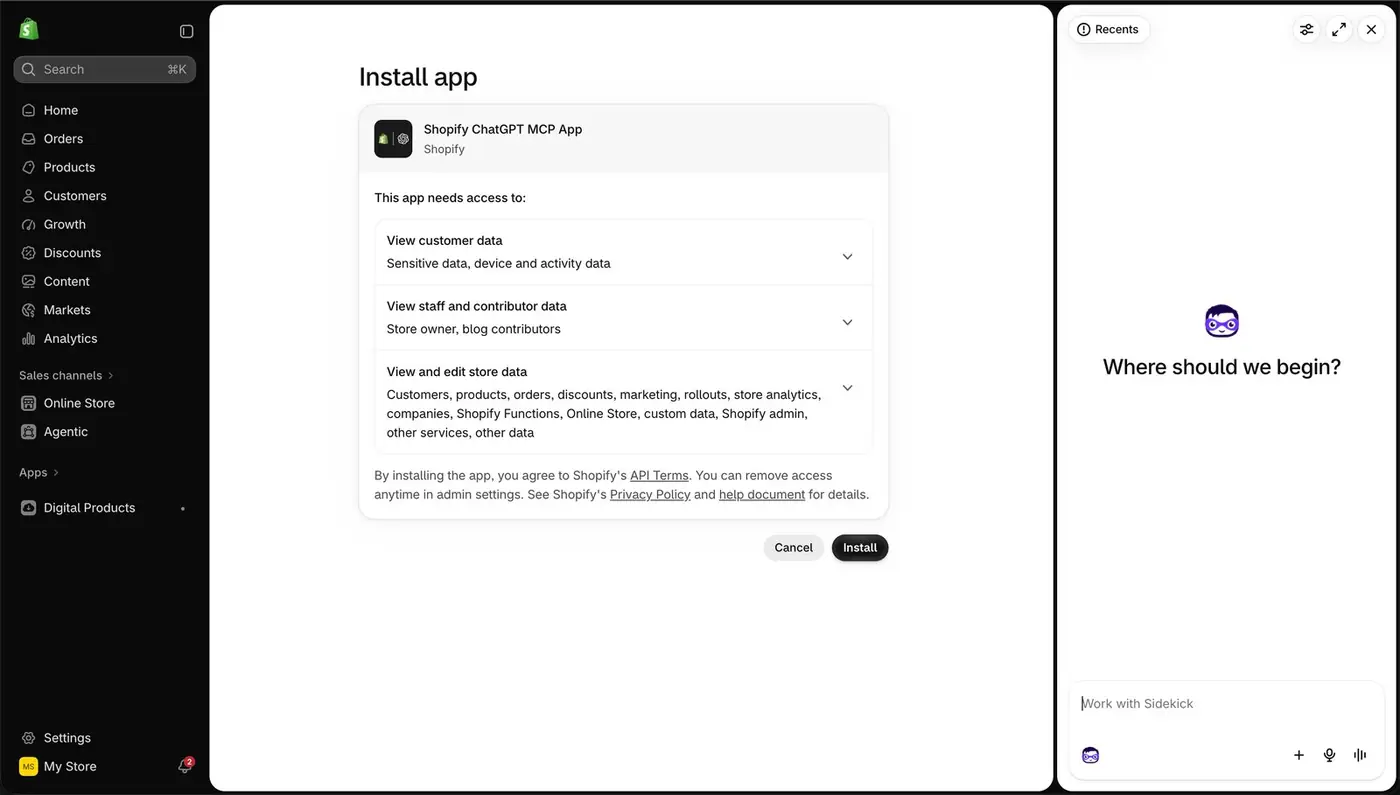
5Read what the app will be able to access: customers, products, orders and your theme.
6Press Install.
7Done. Type @Shopify in any chat to use it.
Why it mattersShopify says the plugin is free to use, for a new store or an existing one. It speeds up repetitive work. You still need to know where every setting lives, because some changes are manual only.
ChatGPT laneFill the [brackets], paste into ChatGPT
Step 9ChatGPT · Dark Hour Shopify Store, Execution, 20 Nov 2026
Know what ChatGPT did, and what stayed manual, when Dark Hour was built
12
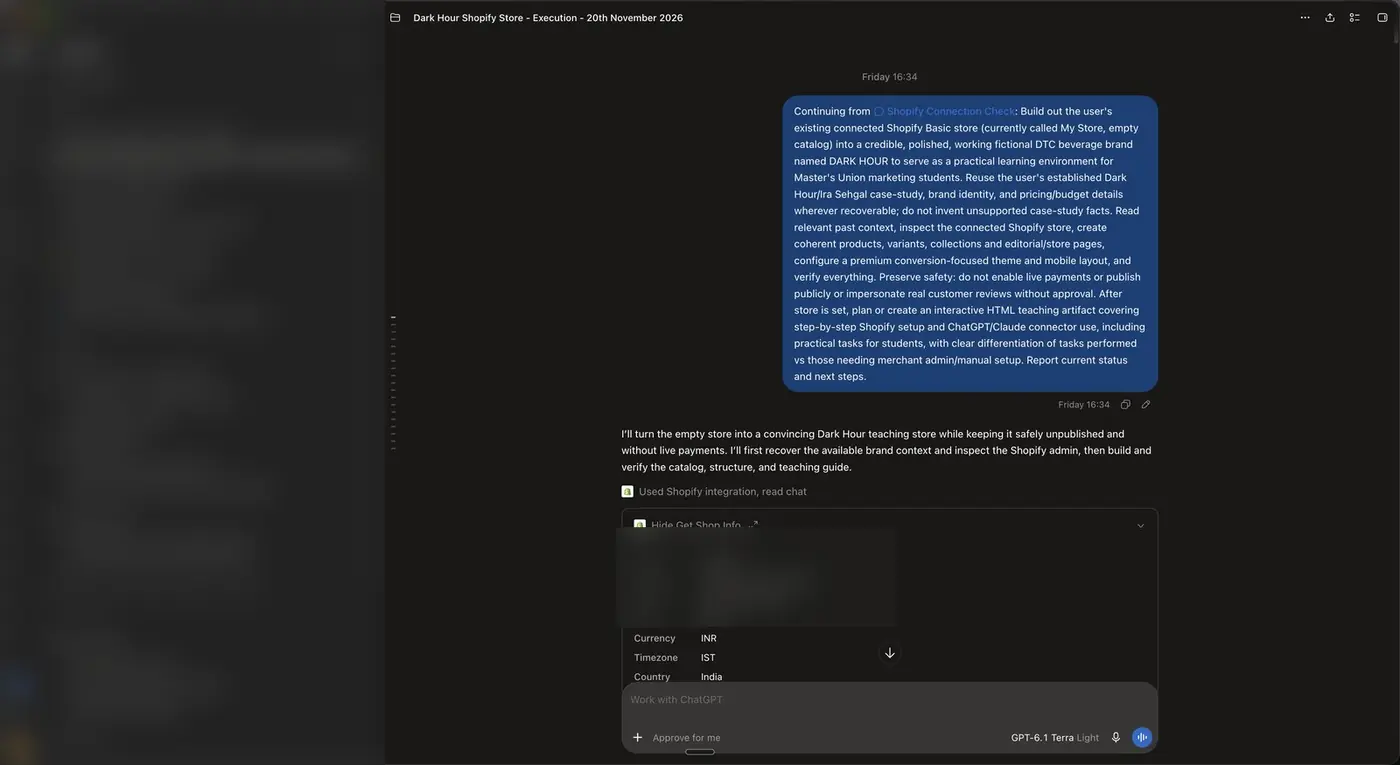
The opening brief Dheeraj sent ChatGPT. Personal details are blurred.
1The brief: build a credible D2C brand called DARK HOUR on the empty store, keep it unpublished, enable no live payments and impersonate no real brand.
2ChatGPT reads the store first (name, domain, plan, currency) and only then builds.
ChatGPT did this through the plugin
Created two products and three variants with practice stock: single can ₹129, 6-pack ₹699, 12-pack ₹1,299
Made two collections (The Lineup, Multipacks) and three pages (The Story, The Bengaluru Drop, Demo FAQ)
Redesigned the Horizon theme in draft and checked it at desktop and phone widths
Recommended apps: Facebook & Instagram by Meta, Judge.me, Microsoft Clarity, Tolstoy and Shopify Bundles
You must do this by hand
Switch checkout to test mode: Settings → Payments
Rename the store: Settings → General
Remove the storefront password: Online Store → Private → Public → Launch
Approve every publish with a clear sentence, such as "I approve publishing this update"
Why it mattersAI does the typing. You stay responsible for anything that touches money, legal pages or going live.
ChatGPT laneFill the [brackets], paste into ChatGPT
Checkpoint: before you move on
Part 2 · Session 4
Make the store look and feel like a brand people trust
A store that works is not yet a store that sells. In this part you set the header, the cover, the homepage order and the product page, publish the policies buyers look for, and learn to push ChatGPT past an average first draft.
Step 1Online Store → Themes → Edit theme
Open the theme editor: three zones and one Save button
345678
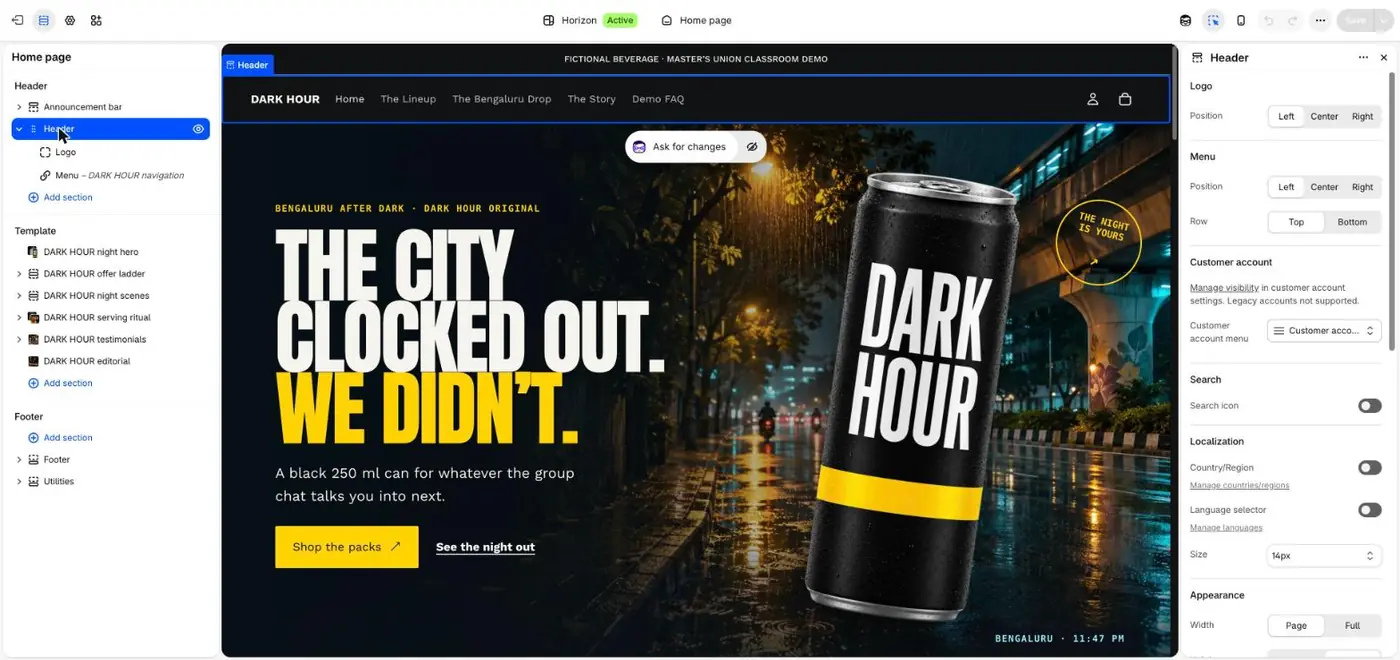
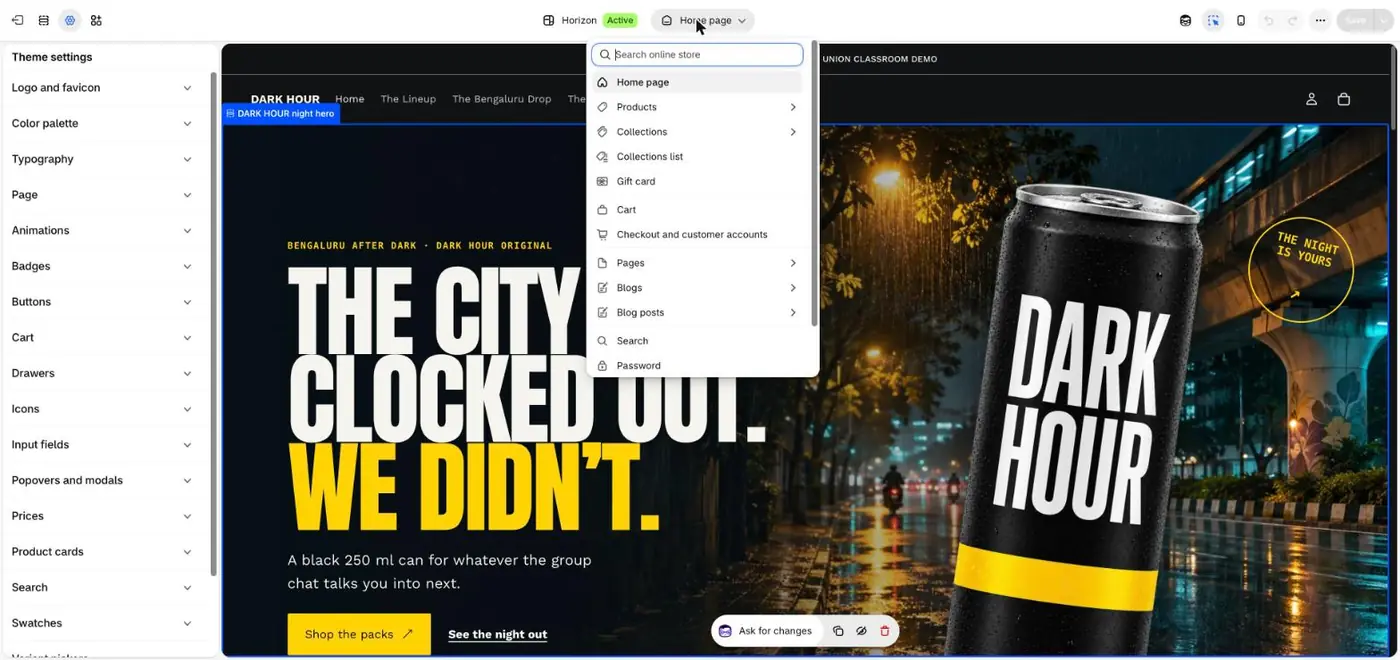
The theme editor
12
Your current theme
1Press Edit theme on your current theme.
2Public or Private: keep the store private while you build, and make it public before ads go live.
3Header: the announcement bar and menu, shown on every page.
4Template: the sections of the page you are editing, from top to bottom.
5Footer: links, policies and social icons, shown on every page.
6Switch the page you are editing: home, product, collection or cart.
7Preview on mobile. Most buyers arrive from an Instagram ad on a phone.
8Nothing goes live until you press Save.
Why it mattersEvery design change in this part happens inside these three zones.
Step 2Theme editor → Header · Content → Menus
Set the header and menu so a buyer reaches the product in one tap
1234
Header settings
56
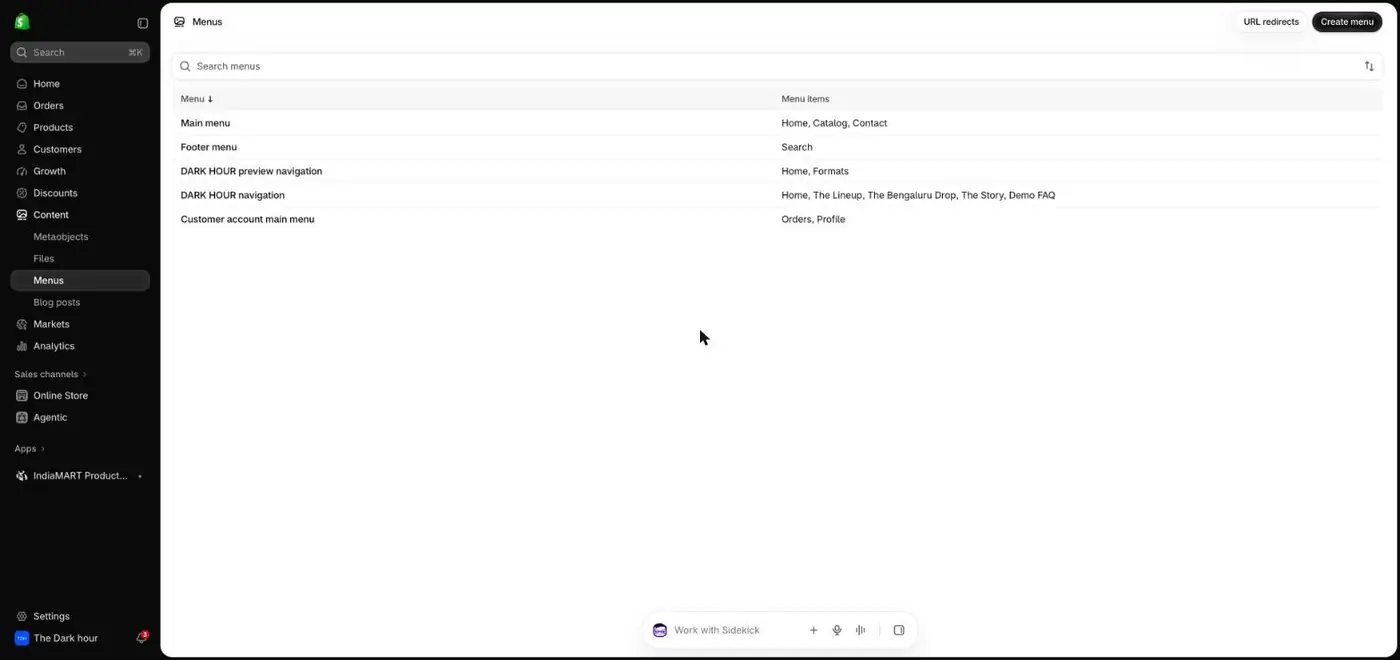
Menus
1The Header holds the logo and the menu.
2Logo position: left is the safe default on phones.
3Menu position and row.
4Search icon: turn it on only when you have more than a handful of products.
5Menus are edited in Content → Menus. Dark Hour uses five items: Home, The Lineup, The Bengaluru Drop, The Story, Demo FAQ.
6Create a separate footer menu for policies.
Why it mattersKeep the main menu to five items or fewer. Every extra link is another way to leave before buying.
ChatGPT laneFill the [brackets], paste into ChatGPT
Step 3Theme editor → Hero section
Choose a cover image with one promise, one product and one button
12345
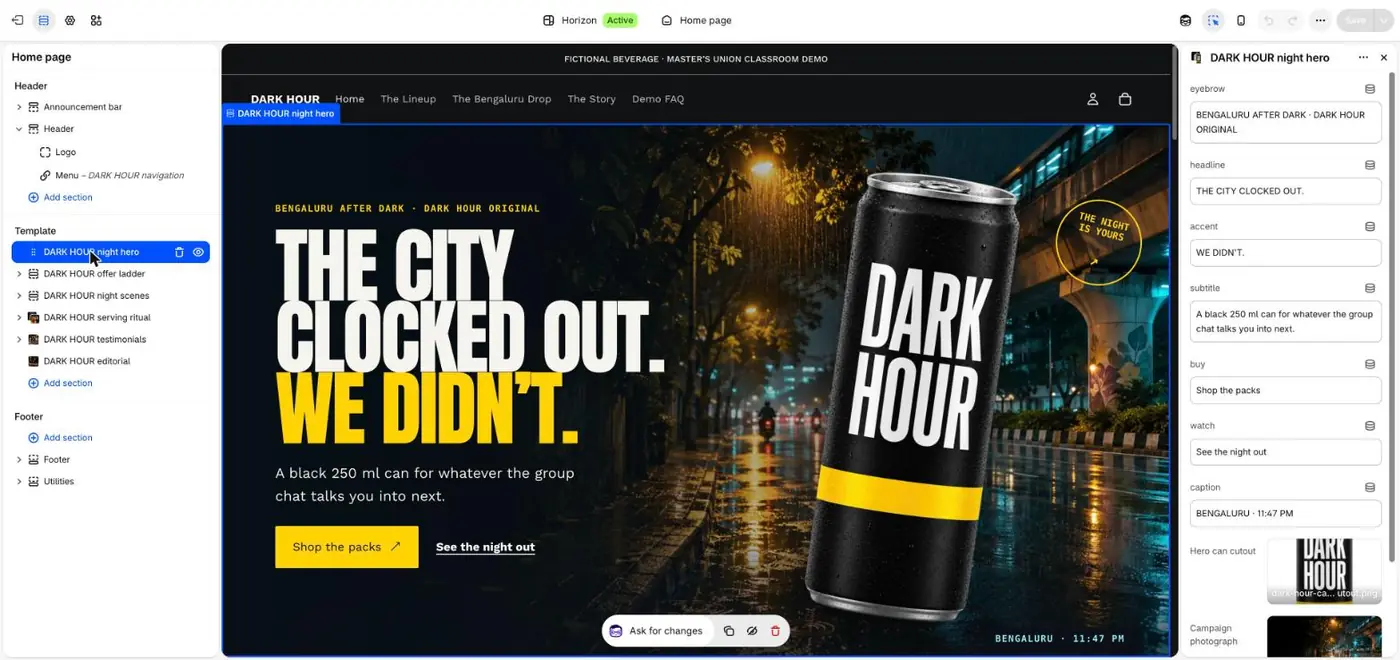
The hero settings
678
The same hero, live
1Eyebrow: a small line that sets the scene.
2Headline: one promise in as few words as possible.
3Subtitle: what it is and who it is for, in one sentence.
4Button text: say exactly what happens next.
5Images: Dark Hour places a cut-out can over a campaign photograph.
6Live, the eyebrow, headline and button read top to bottom in about two seconds.
7The product is the biggest object on the screen.
8One main button, visible without scrolling on a phone.
How to decide your cover
Show the product where it is used, not on a white table.
If you can afford one great photo, spend it here.
Check it at phone size. If the headline is hard to read over the photo, darken the photo.
Match the cover to your best ad, so the click feels like a continuation.
Why it mattersThe cover is the first thing every ad click lands on. It has a few seconds to confirm the person is in the right place.
ChatGPT laneFill the [brackets], paste into ChatGPT
Step 4Theme editor → Add section
Build the homepage section by section, in the order a buyer decides
12
The section picker
34
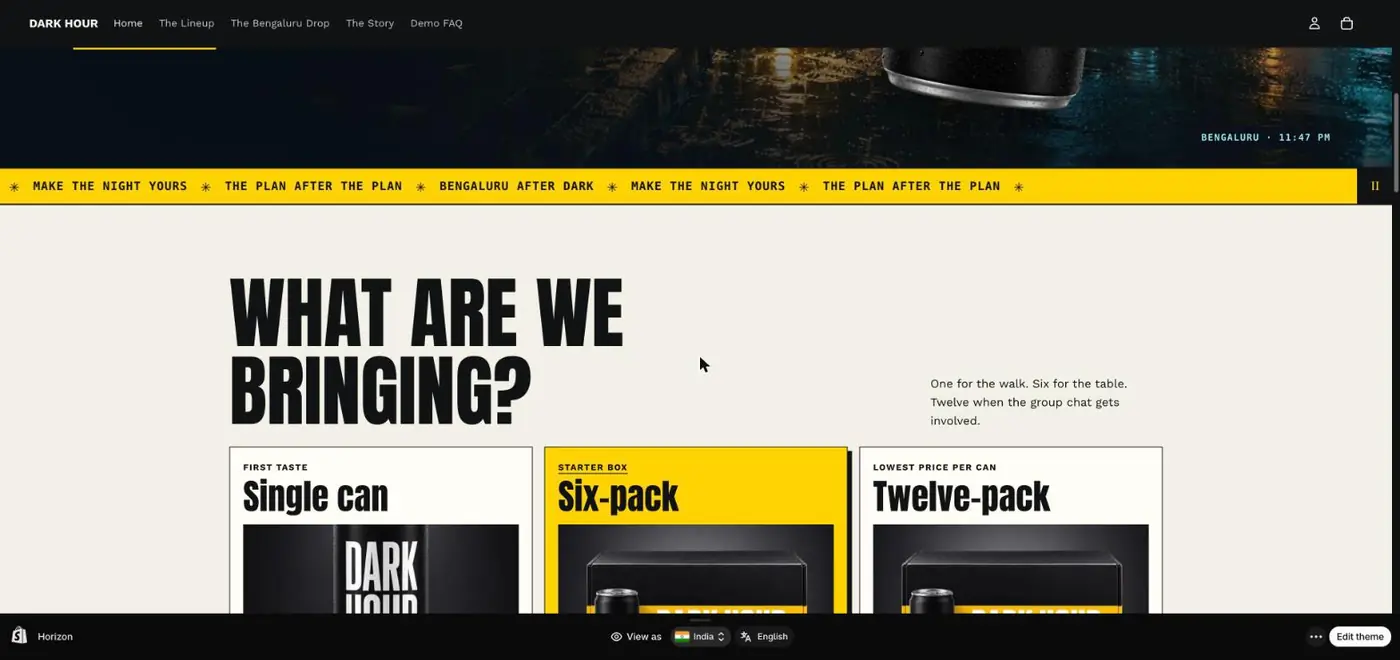
Ticker and pack offers, live
56
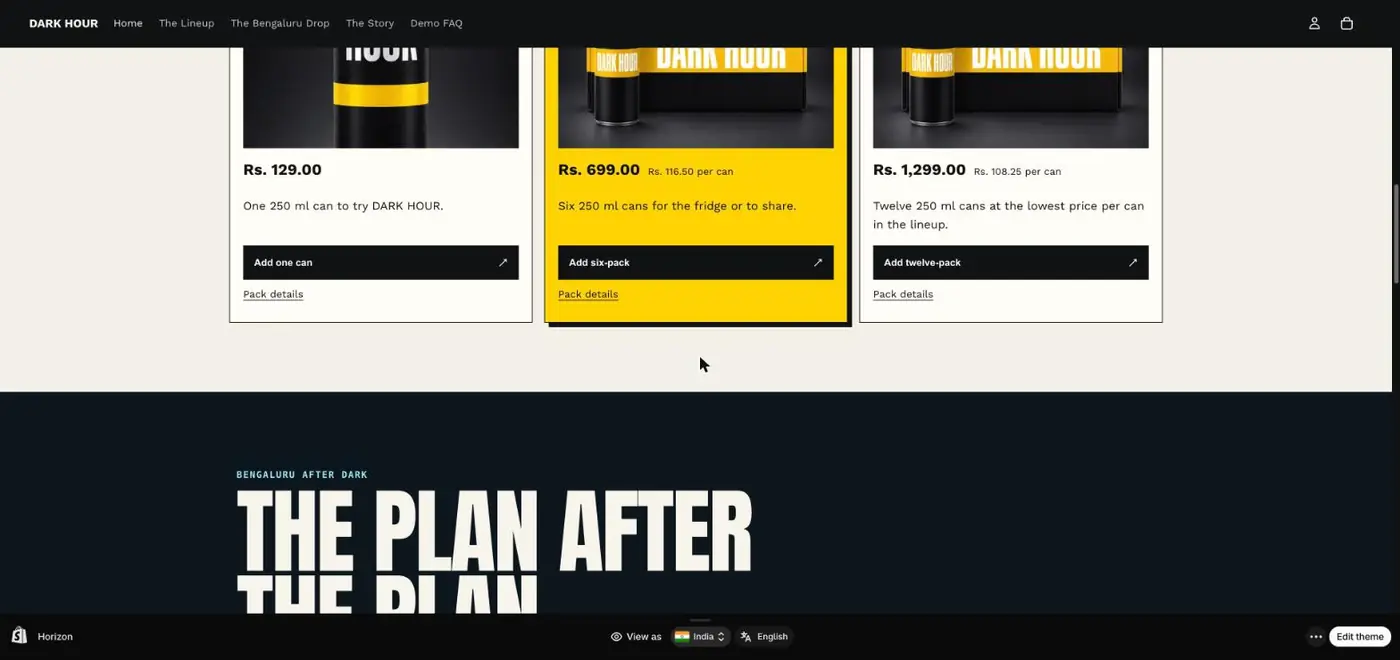
The pack cards
1Search sections or browse by category.
2Banners hold hero images. Start here if your theme has none.
3A moving ticker repeats the brand line without taking much space.
4The offer ladder: three choices, with the middle one highlighted.
5Show the price per unit so the bigger pack feels like the better deal.
6Each card adds that exact pack to the cart in one tap.
A homepage order that matches how people decide
Announcement bar: the offer or the free shipping line
Hero: am I in the right place?
Products or packs: what can I buy?
Three reasons: why this one?
Proof: reviews, ratings, customer reels
What is inside and how to use it
FAQ: delivery, returns, payment
Footer with policies and contact
Why it mattersA buyer from an ad asks the same questions in the same order. Each section answers one of them.
ChatGPT laneFill the [brackets], paste into ChatGPT
Step 5Theme editor → Products → Default product
Make the product page answer every doubt next to Add to cart
23456
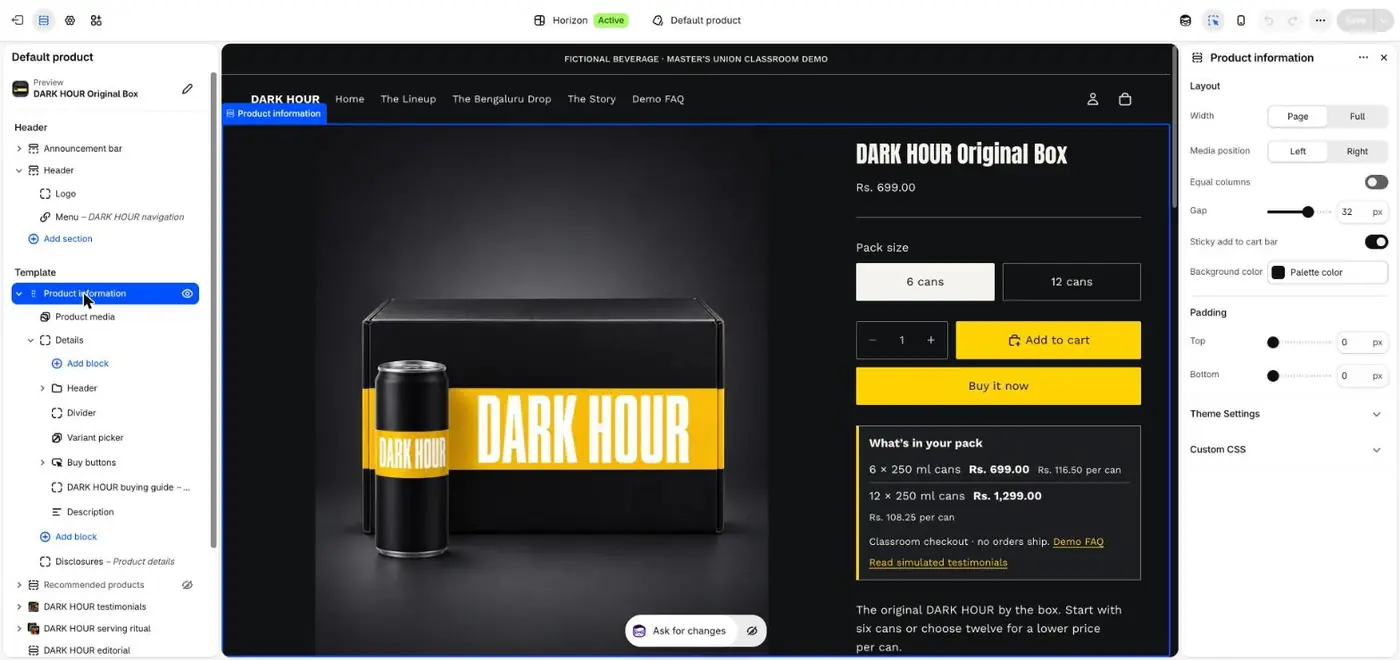
Product information blocks
1
Switching to the product template
78
The same page in mobile view
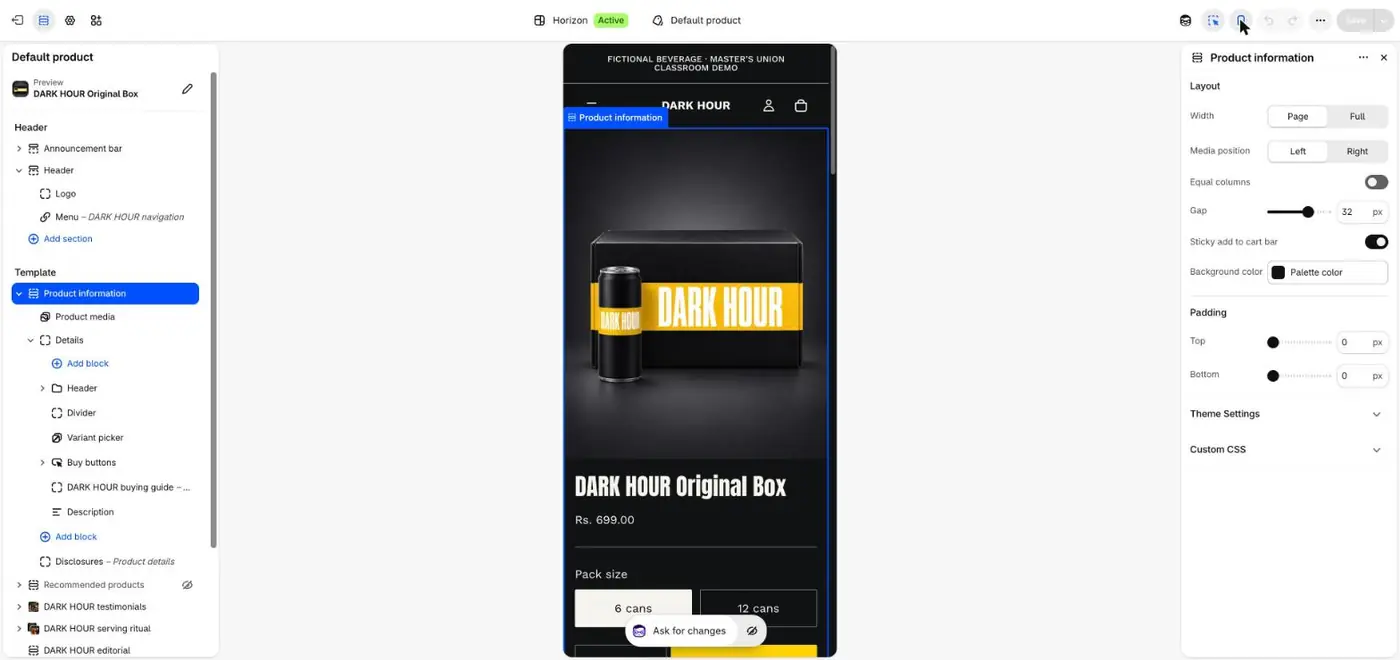
1Switch the editor to the product template.
2Variant picker: show packs or sizes as buttons, not a dropdown.
3Buy buttons: Add to cart and Buy it now.
4The description block.
5Turn on the sticky add to cart bar so the button follows the scroll on phones.
6Dark Hour adds a "What's in your pack" box with per-can prices right under the buttons.
7Check it in mobile view.
8On a phone, price, options and the button should be visible without much scrolling.
Why it mattersIn Ira's test week, 95 of every 100 product page visitors left without adding to cart. This page is the leak to fix first.
ChatGPT laneFill the [brackets], paste into ChatGPT
Step 6Theme editor → Theme settings
Set brand colours, fonts and logo once for the whole store
1234
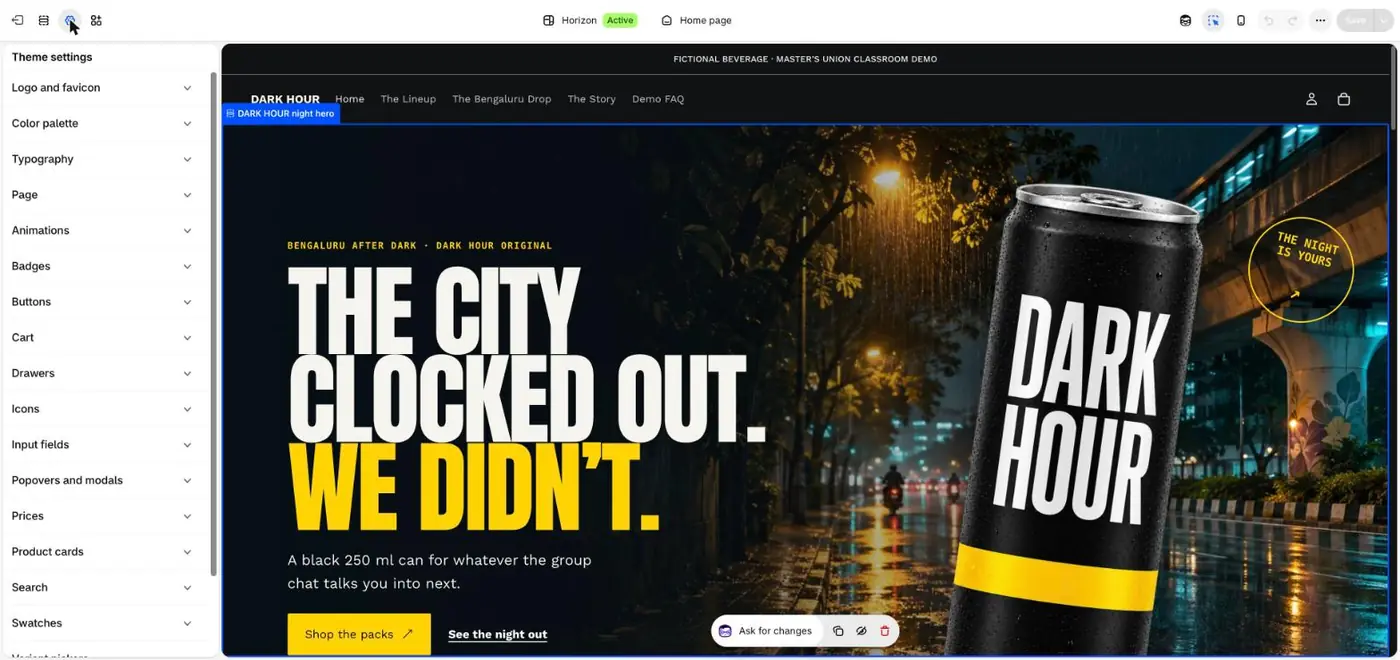
Theme settings
1Upload the logo and a small square favicon for the browser tab.
2Colour palette: two brand colours plus black or white.
3Typography: one display font for headings and one easy-to-read font for text.
4Buttons: one style everywhere, in your strongest colour.
Why it mattersConsistency is what makes a three-day-old store look like a brand.
ChatGPT laneFill the [brackets], paste into ChatGPT
Step 7Settings → Policies · Settings → Shipping and delivery
Publish the policies and shipping rules buyers look for before paying
123
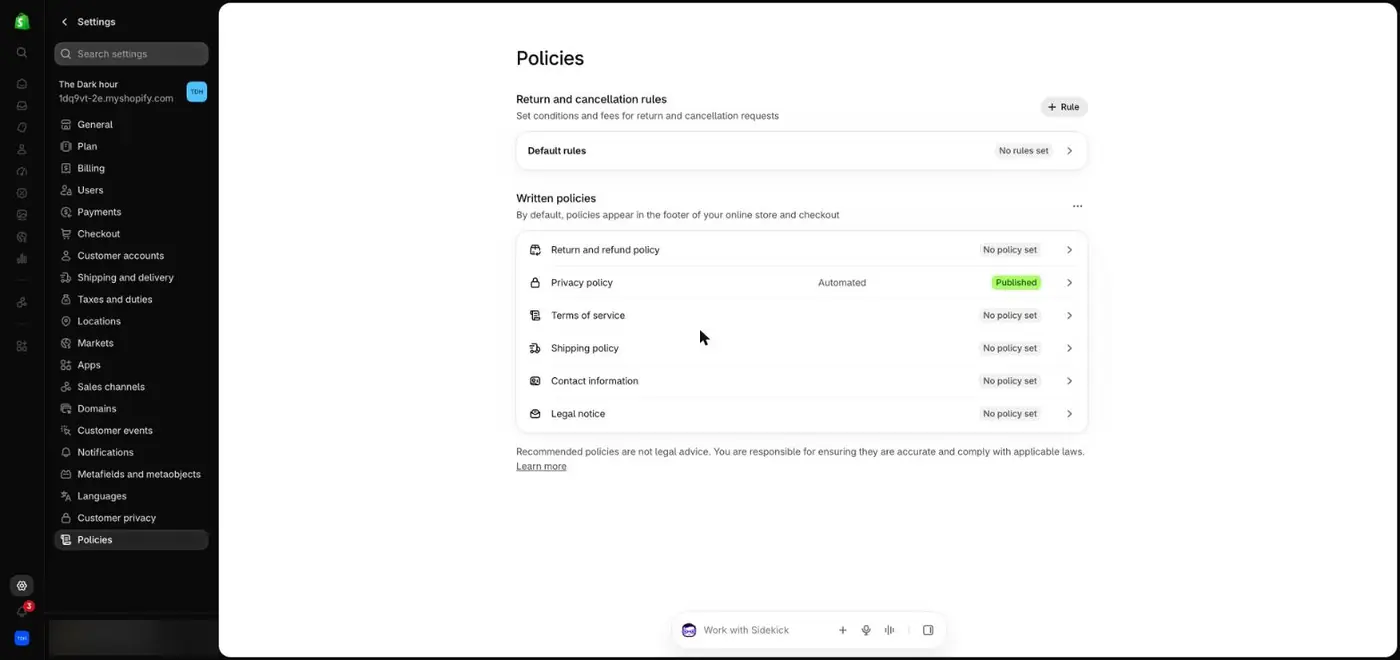
Written policies
45
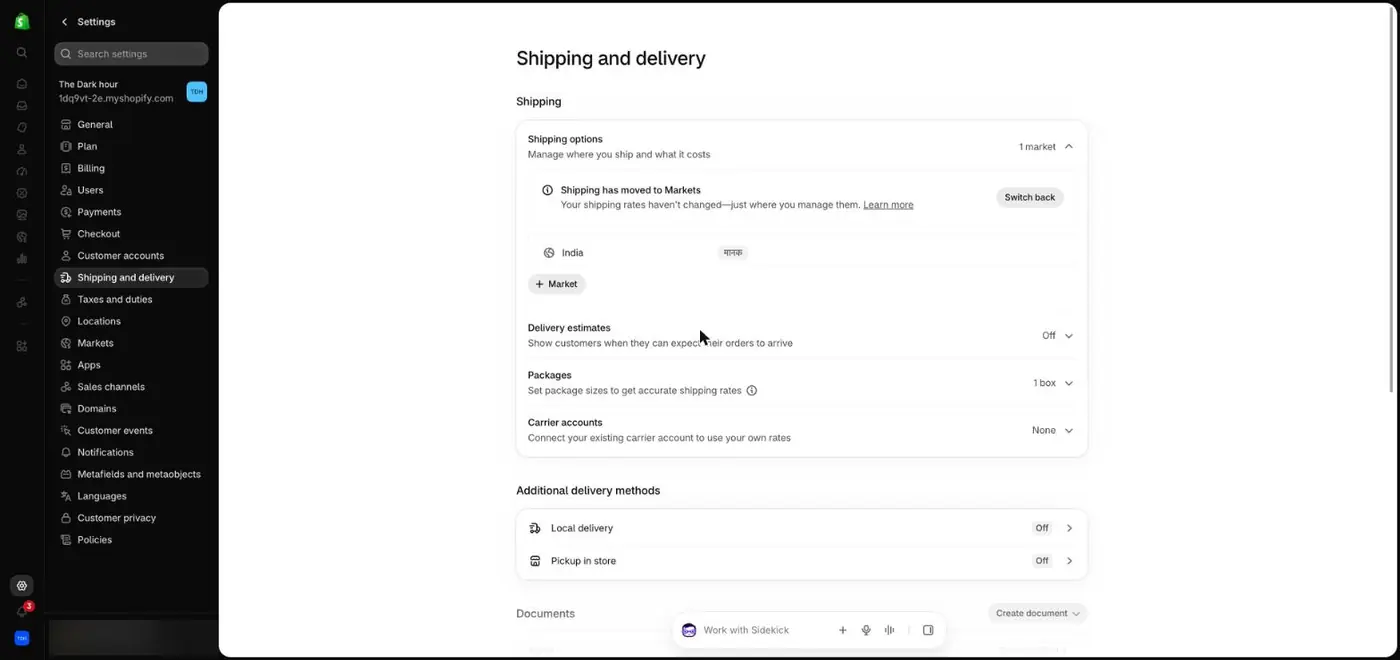
Shipping and delivery
1Write a return and refund policy.
2Write a shipping policy with your real delivery times.
3Add contact information.
4Set where you ship and the rates. Shipping is now managed through Markets.
5Turn on delivery estimates if your courier is predictable.
Why it mattersPolicies appear in your footer and at checkout. Buyers look for returns and delivery times before they pay, and missing contact details make a new store look unsafe.
ChatGPT laneFill the [brackets], paste into ChatGPT
Step 8ChatGPT + Shopify plugin
Drive ChatGPT like a creative director, the way Dark Hour was built
4567
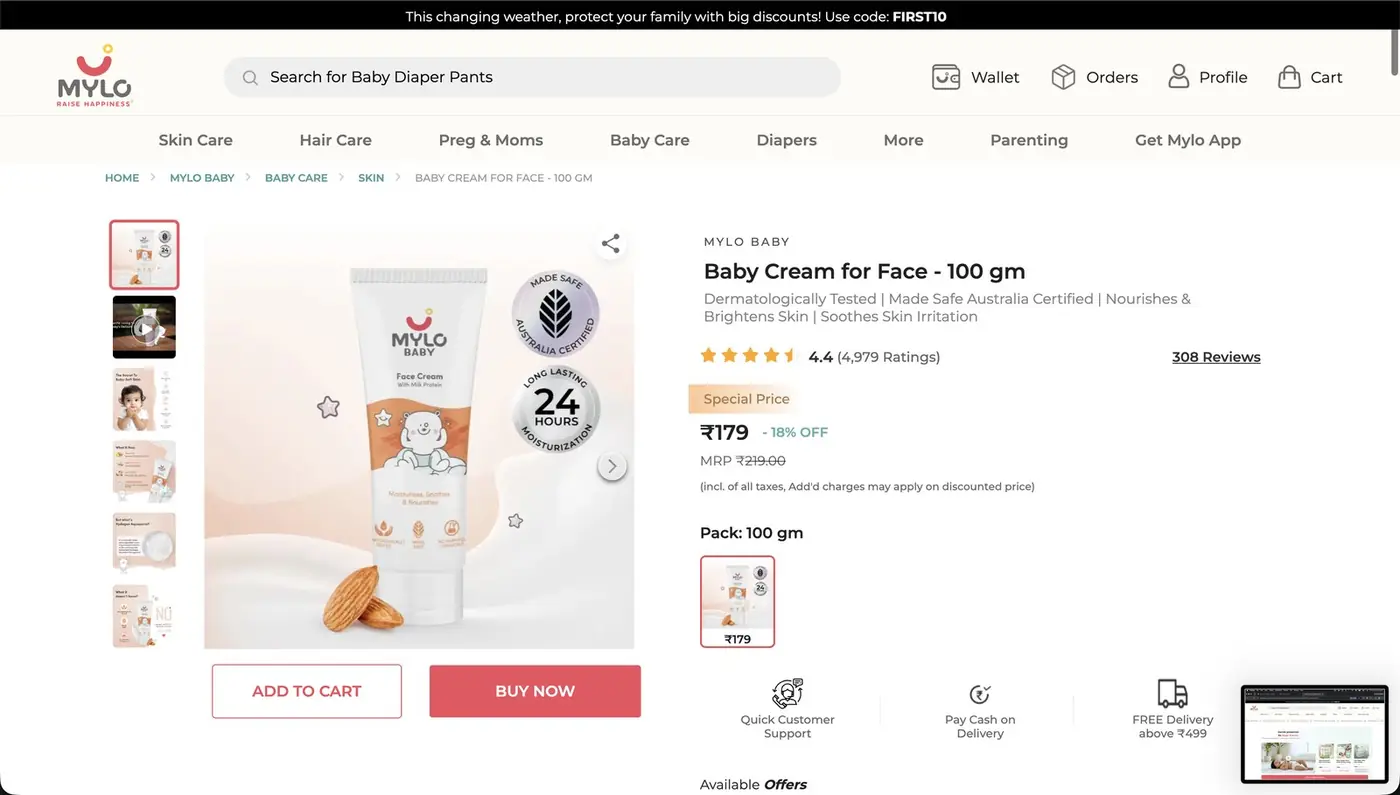
Reference 2: a Mylo product page
123
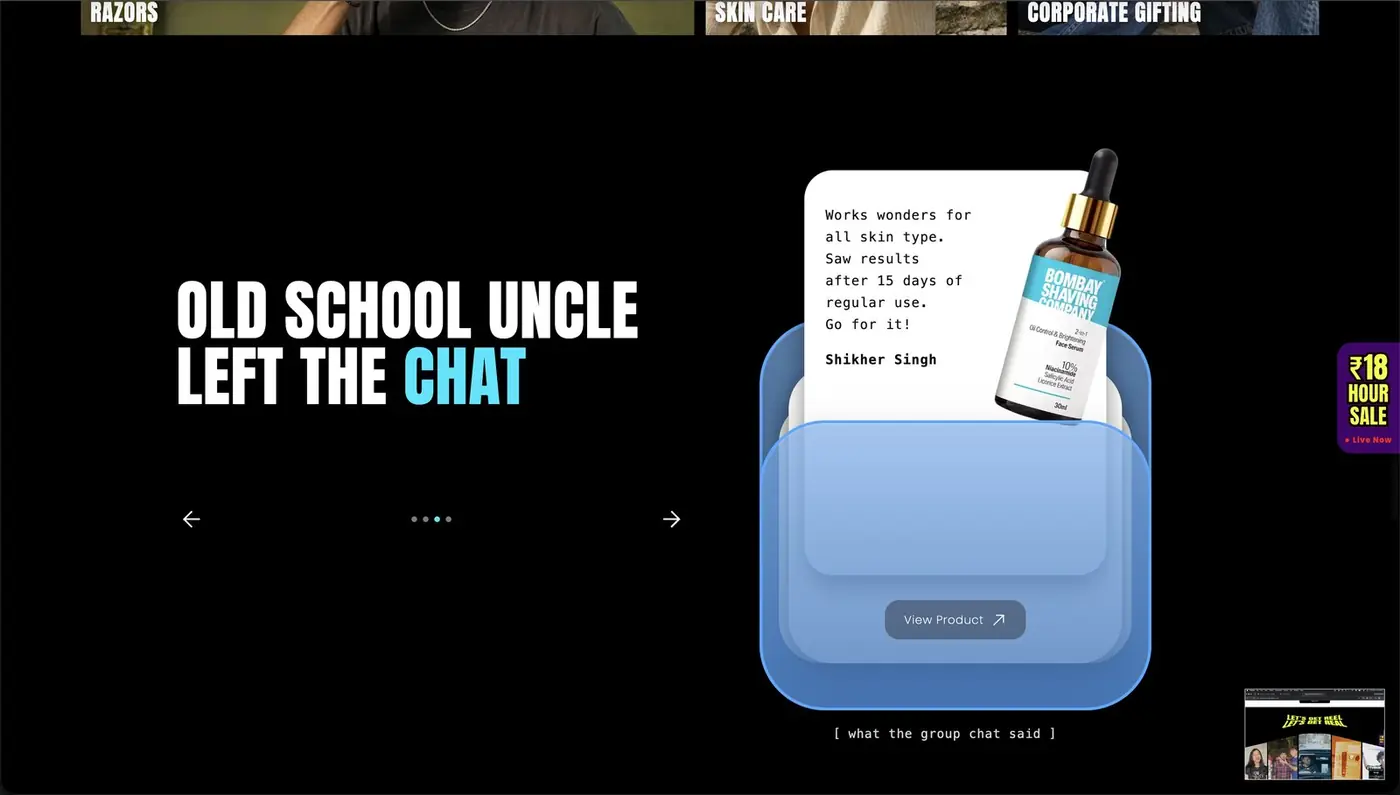
Reference 1: Bombay Shaving Company, a screenshot Dheeraj gave ChatGPT
8
Reference 3: a review styled as a note
910
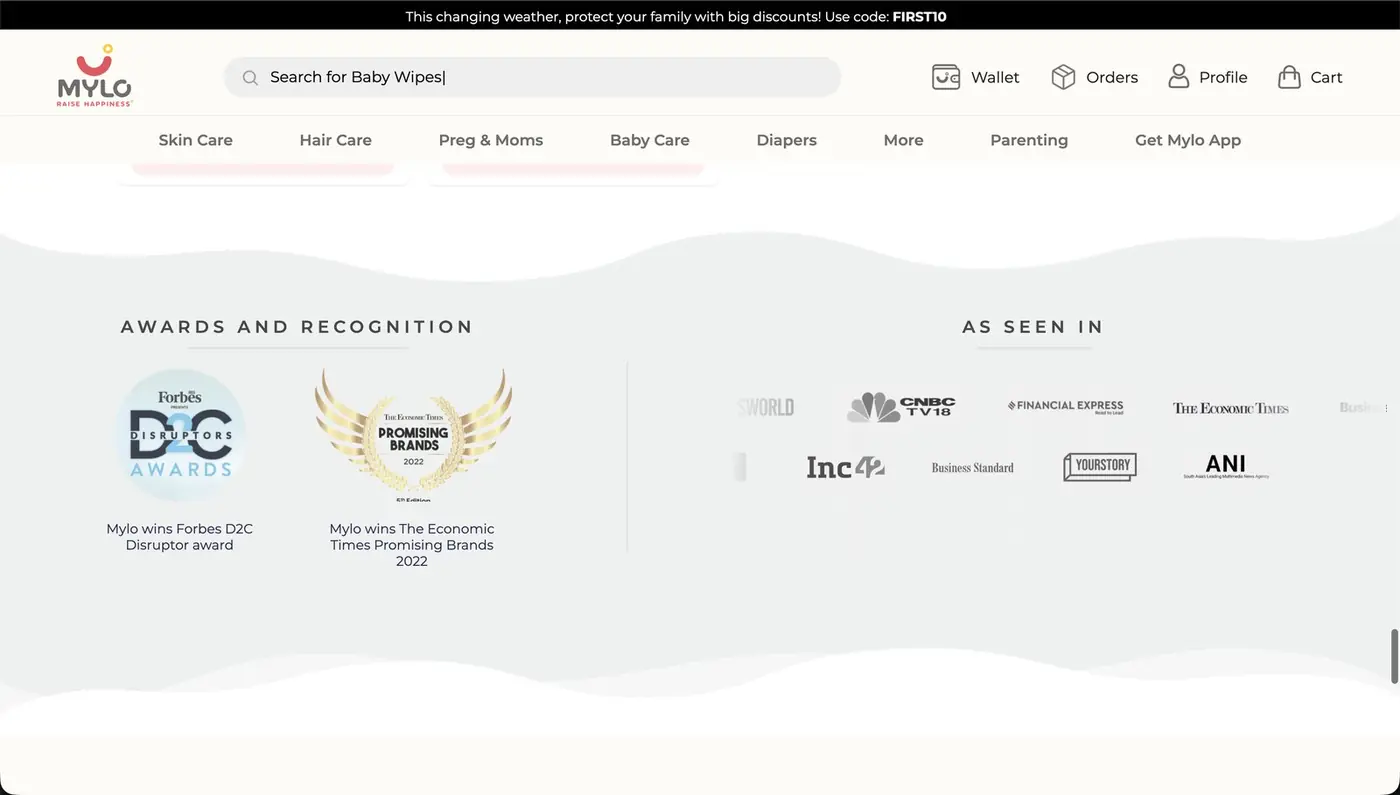
Reference 4: awards and press
1One giant promise in display type.
2Proof as icons: years, awards, customers.
3A sale tab that stays on screen while you scroll.
4Rating and review count next to the product name.
5MRP struck out, with the percentage off.
6Two buttons: Add to cart and Buy now.
7A trust row: support, cash on delivery, free delivery above a threshold.
8A customer quote styled like a handwritten note.
9Awards.
10Press logos under "As seen in".
The loop that took Dark Hour from boring to 9/10
Brief and build. ChatGPT built products, collections, pages and a theme in draft.
Honest feedback. Dheeraj replied: The store looks incredibly boring and has no real marketing calibre.
Feed references. He attached screenshots of Bombay Shaving Company and Mylo, and asked for quirky layouts, exciting imagery and reviews that make people want to buy.
Score it.Definitely better. But it is still 7/10 at best.
Ask for concepts before building.Please brainstorm and show me image concepts before we execute. ChatGPT returned three directions: The Night Jumps Out, Night Shift Transmission and The Group Chat Comes Alive.
Pick a hybrid, then publish.Create a hybrid of all 3 and execute. Publishing went live only after an explicit approval.
The Dark Hour testimonials are labelled as simulated because it is a classroom store. On your real store, use real reviews only. Judge.me collects them after delivery.
Why it mattersThe first version any AI builds is average by design. Quality comes from your references, a score and a request for options before it builds.
ChatGPT laneFill the [brackets], paste into ChatGPT
Step 9Your phone, in a private window
Audit your store against this checklist before you spend a rupee
Why it mattersA rupee spent sending people to a weak page is a rupee lost. Fix the page first, then buy traffic.
ChatGPT laneFill the [brackets], paste into ChatGPT
Checkpoint: before you move on
Part 3 · Session 5
Connect Meta and launch three ads at ₹1,000 a day
This is where Session 3's theory turns into settings. You connect Shopify to Meta so ads can see purchases, build one Sales campaign, set the audience with controls and suggestions, make three ads, and check everything before it goes live.
Step 1Shopify App Store → Facebook & Instagram by Meta
Connect Shopify to Meta so your ads can see who bought
12
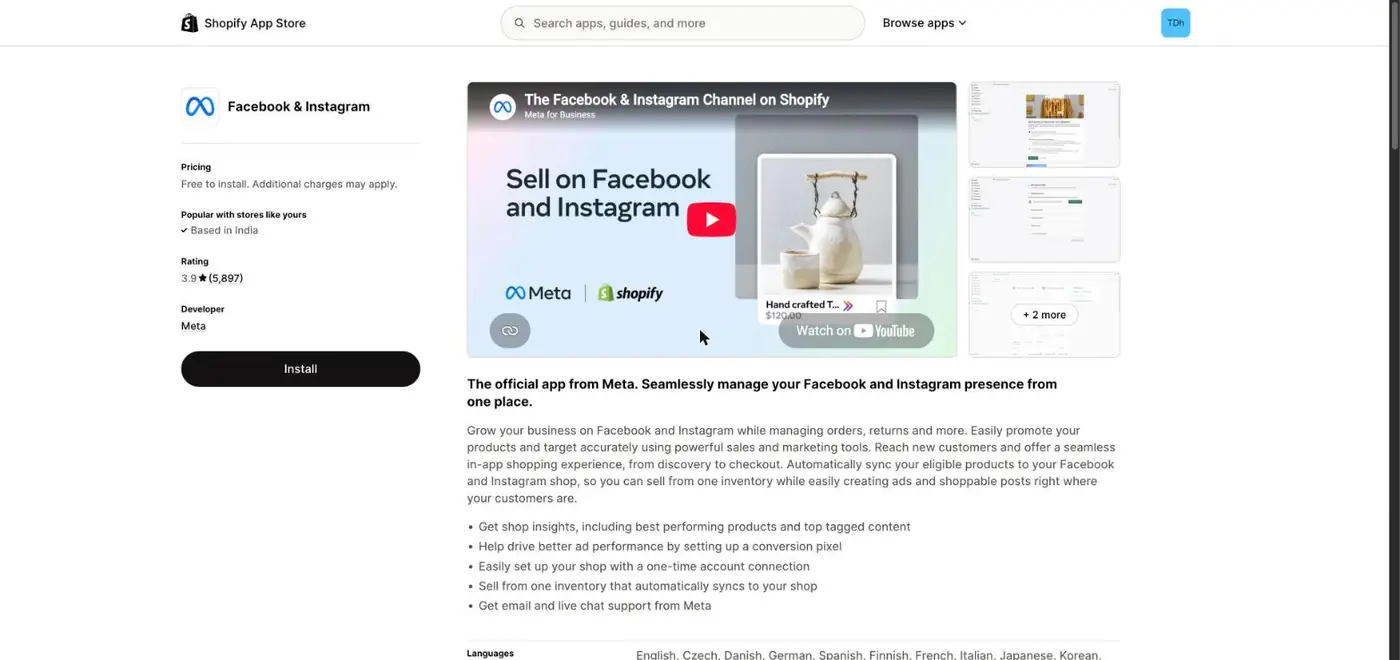
The official Meta app for Shopify
1Install Facebook & Instagram, the official app from Meta.
2During setup, connect your business portfolio, Facebook Page, Instagram account and ad account, and turn on data sharing. That installs the conversion pixel, which Ads Manager calls a dataset.
Have these ready first
A Facebook Page for the brand
An Instagram professional account linked to that Page
A Meta ad account with a payment method added
Your store set to Public
Why it mattersWithout the pixel, Meta cannot see who bought, so it cannot find more people like them. This is your first-party data from Session 3.
ChatGPT laneFill the [brackets], paste into ChatGPT
Step 2adsmanager.facebook.com
Read Ads Manager as three layers: campaign, ad set and ad
1234
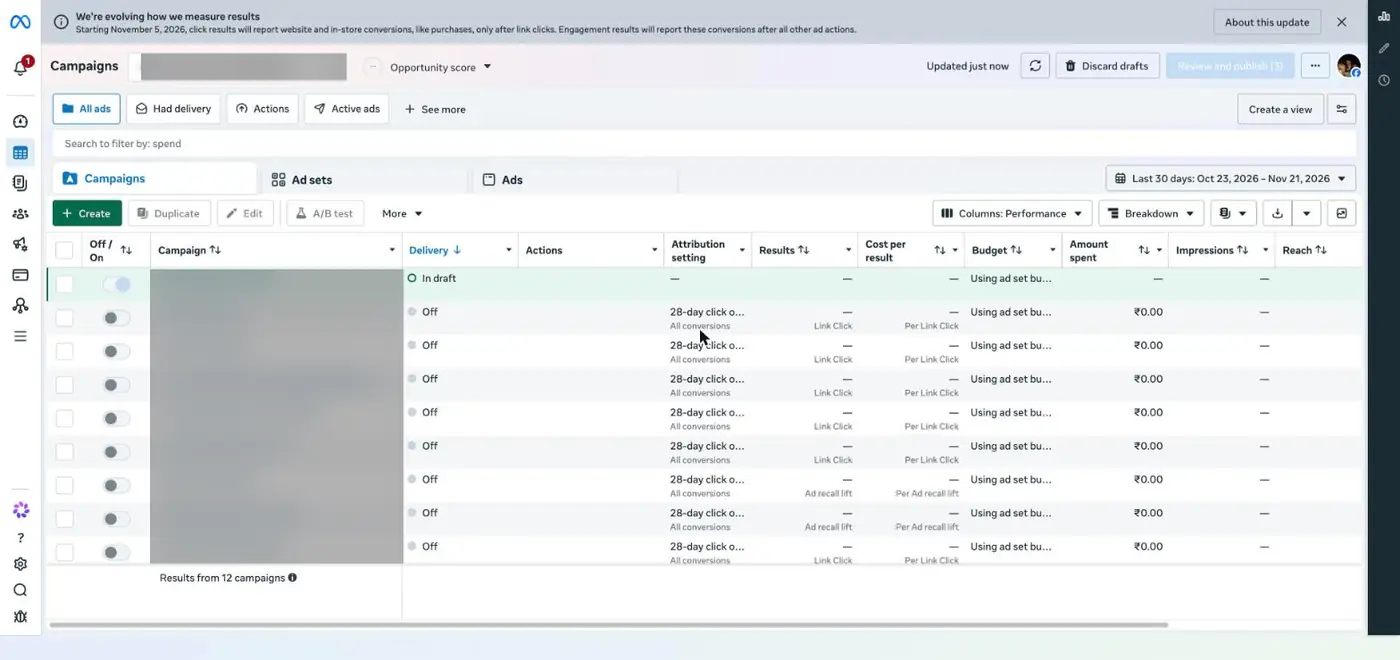
Ads Manager. Campaign names are blurred.
1Create starts a new campaign.
2The three tabs are the three layers. Campaign holds the goal and budget. Ad set holds who sees it, where and when. Ad holds what they see.
3Attribution setting: how Meta decides which ad gets credit for a sale. Part 4 explains it.
4Meta's notice inside Ads Manager: from 5 November 2026, click results report website purchases only after link clicks.
Why it mattersEvery setting you touch belongs to one layer. Knowing which saves you from editing the wrong one.
Step 3Create → Choose a campaign objective
Choose Sales as the objective, because you want purchases
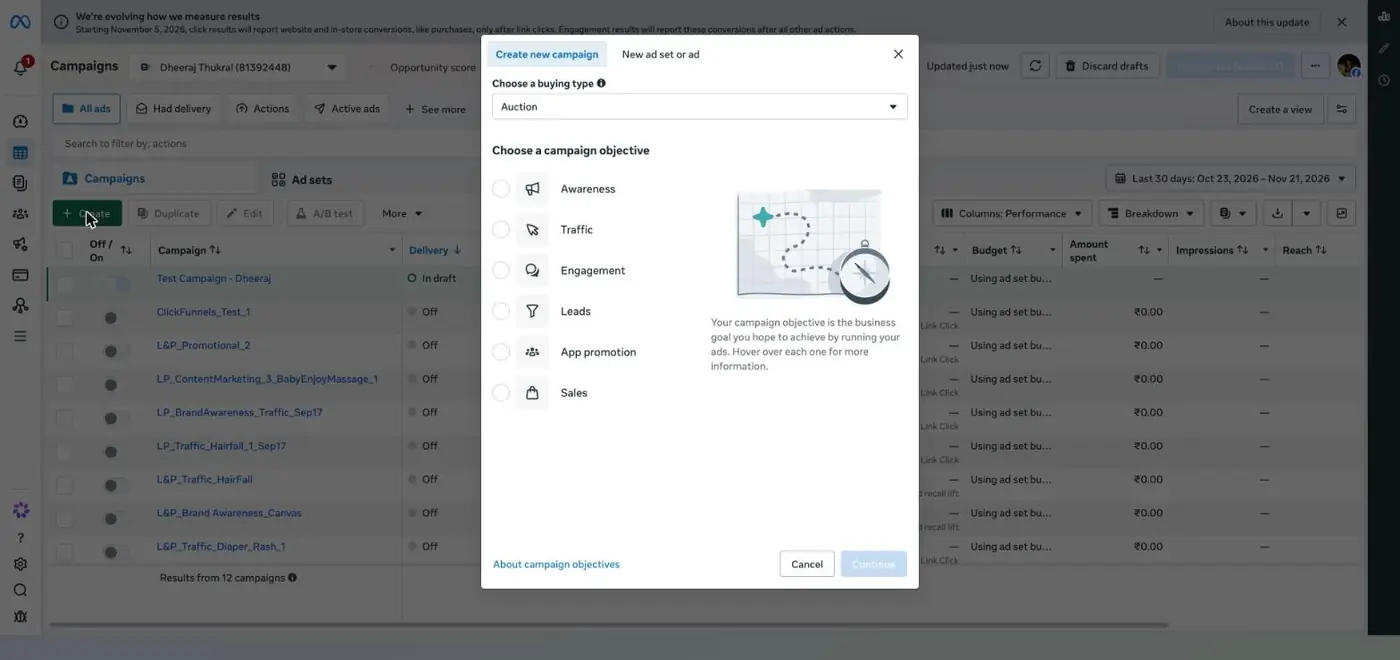
Six objectives
123
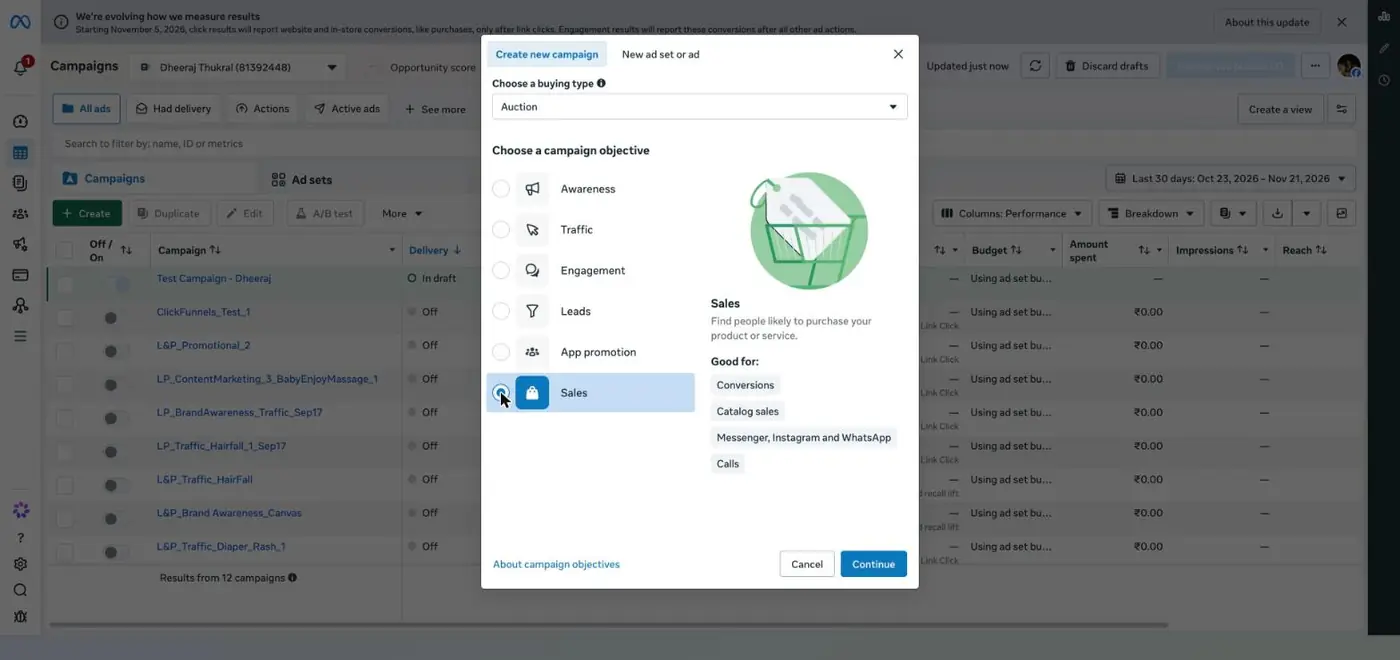
Sales selected
1Choose Sales.
2Sales is built for conversions such as purchases.
3Press Continue.
Why not Traffic?
Traffic finds people who click, not people who buy. In Session 2, Ira's Reel B won the clicks and Reel C won the orders. Meta optimises for exactly what you choose.
Why it mattersThe objective tells Meta's system what success looks like. Pick the one that matches your goal.
Step 4Campaign level
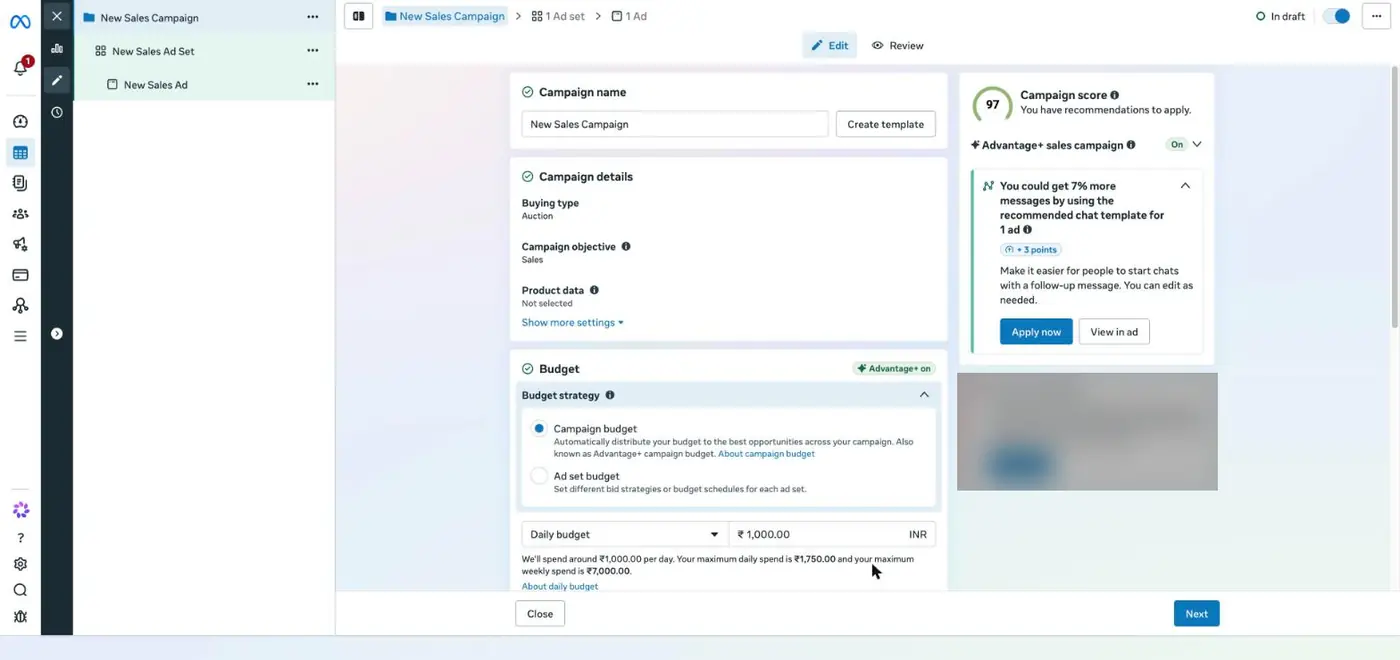
Set the campaign budget to ₹1,000 a day, and read what Meta may spend
12345
The campaign level of a draft. Account notices are blurred.
1Name it so you can read it later, for example Brand_Sales_Test1_Nov.
2Advantage+ sales campaign is on by default: Meta automates audience and placements.
3Campaign budget lets Meta move money to whichever ad set works.
4Daily budget: ₹1,000.
5Read the line underneath: Meta may spend up to ₹1,750 on one day, but no more than ₹7,000 in a week.
Why it mattersA daily budget is an average, not a hard cap for each day. Plan your total spend from the weekly figure.
Step 5Ad set level → Conversion
At the ad set, send people to your website and optimise for Purchase
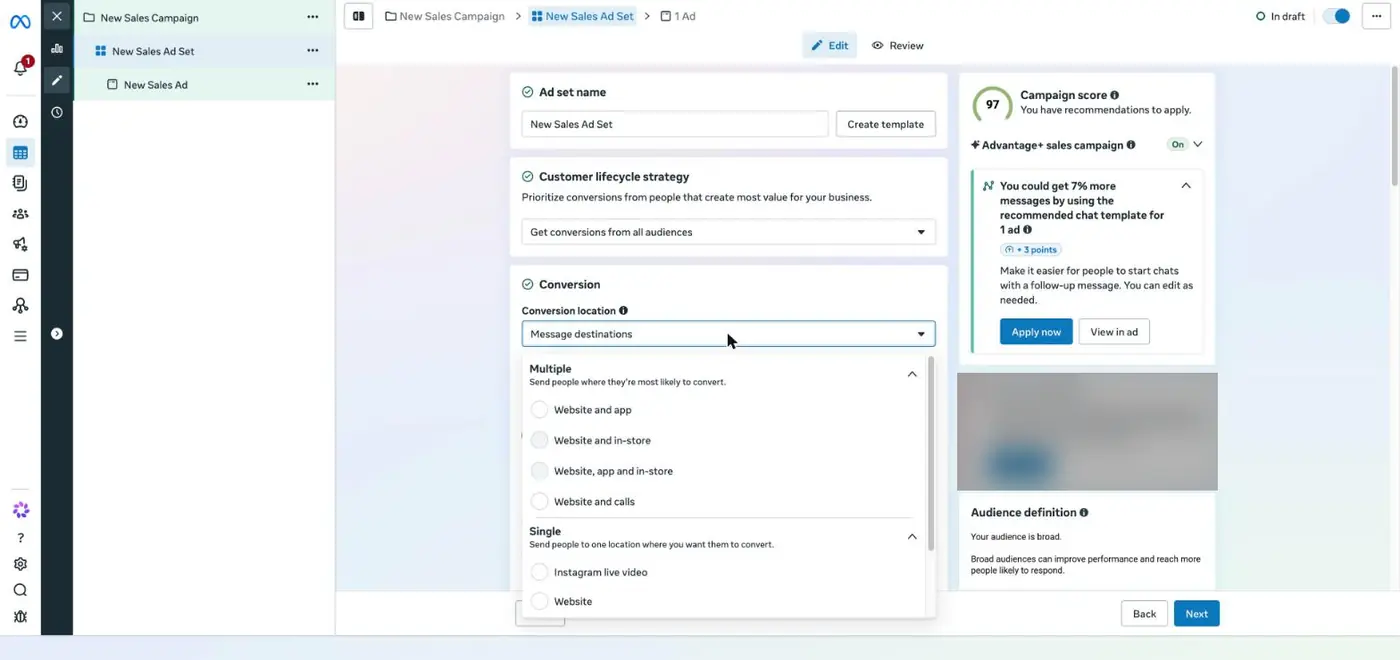
The conversion location list
123
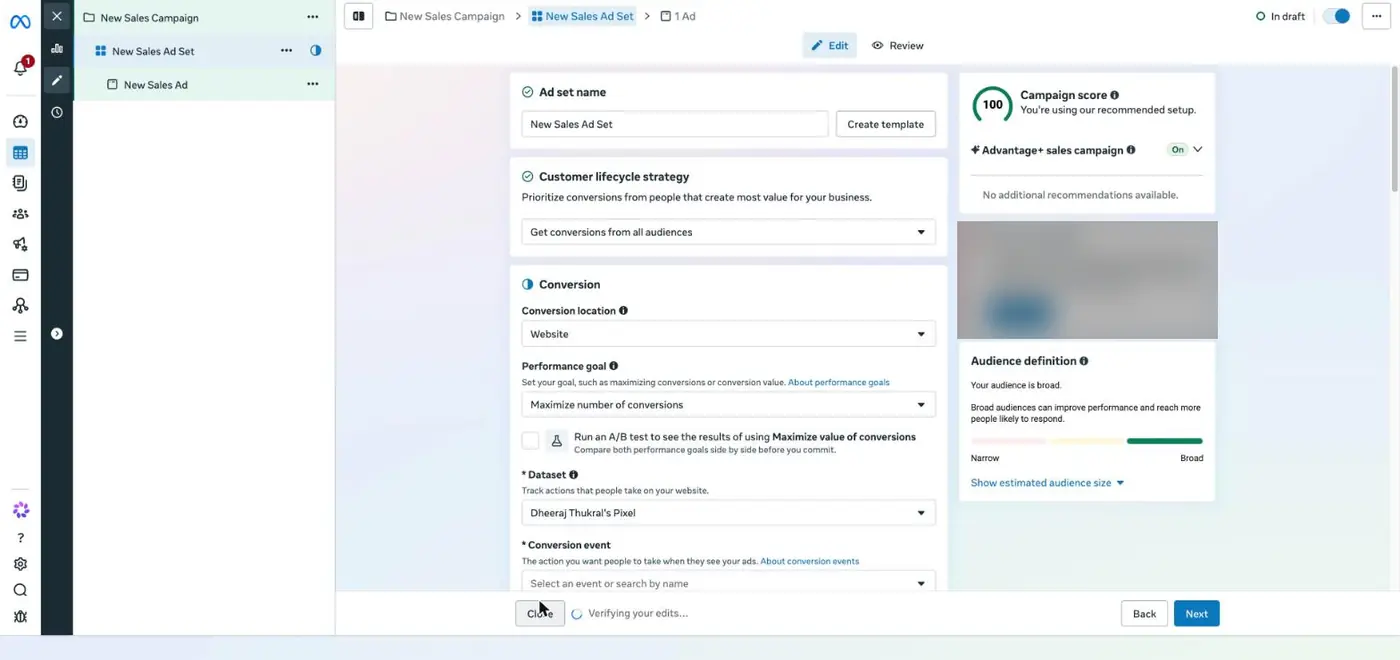
Website selected
45
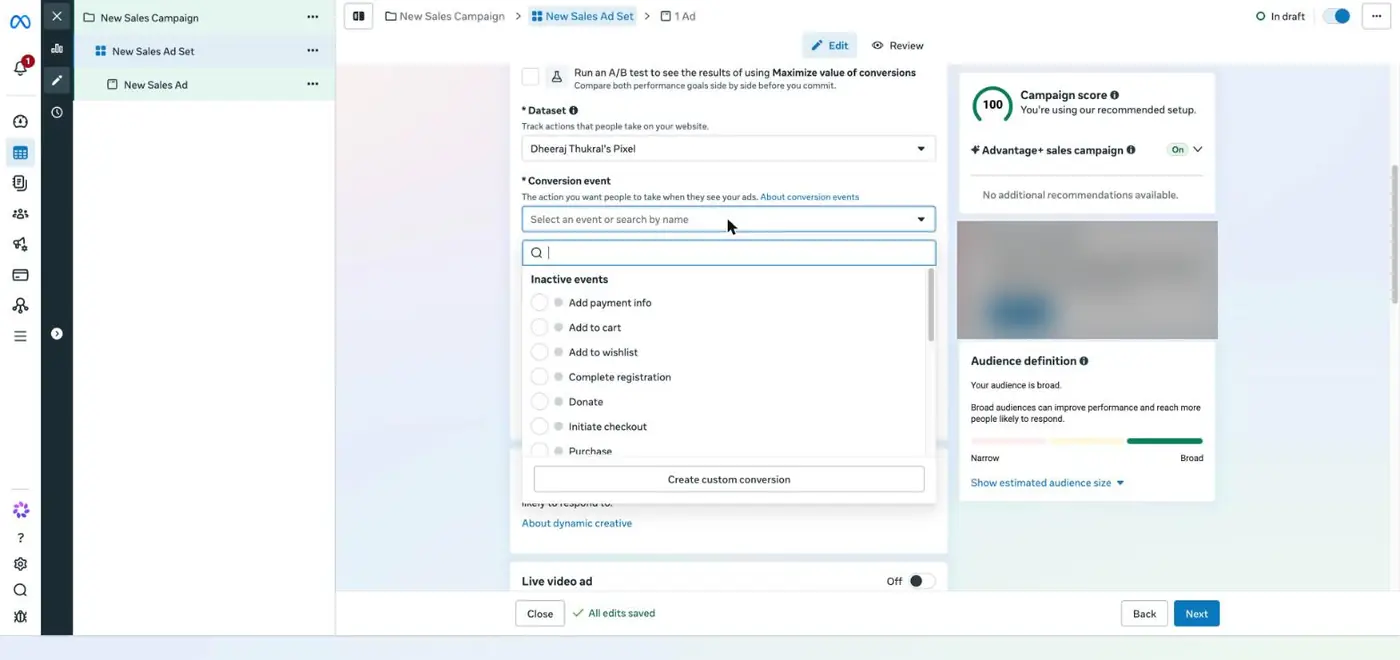
Conversion events
1Conversion location: Website. In this draft Meta defaulted to Message destinations, so always check it.
2Performance goal: Maximise number of conversions.
3Dataset: your pixel from step 1.
4Events show as inactive until your store sends them. One test purchase activates them.
5Choose Purchase.
Why it mattersIf the conversion event is wrong, Meta looks for the wrong people.
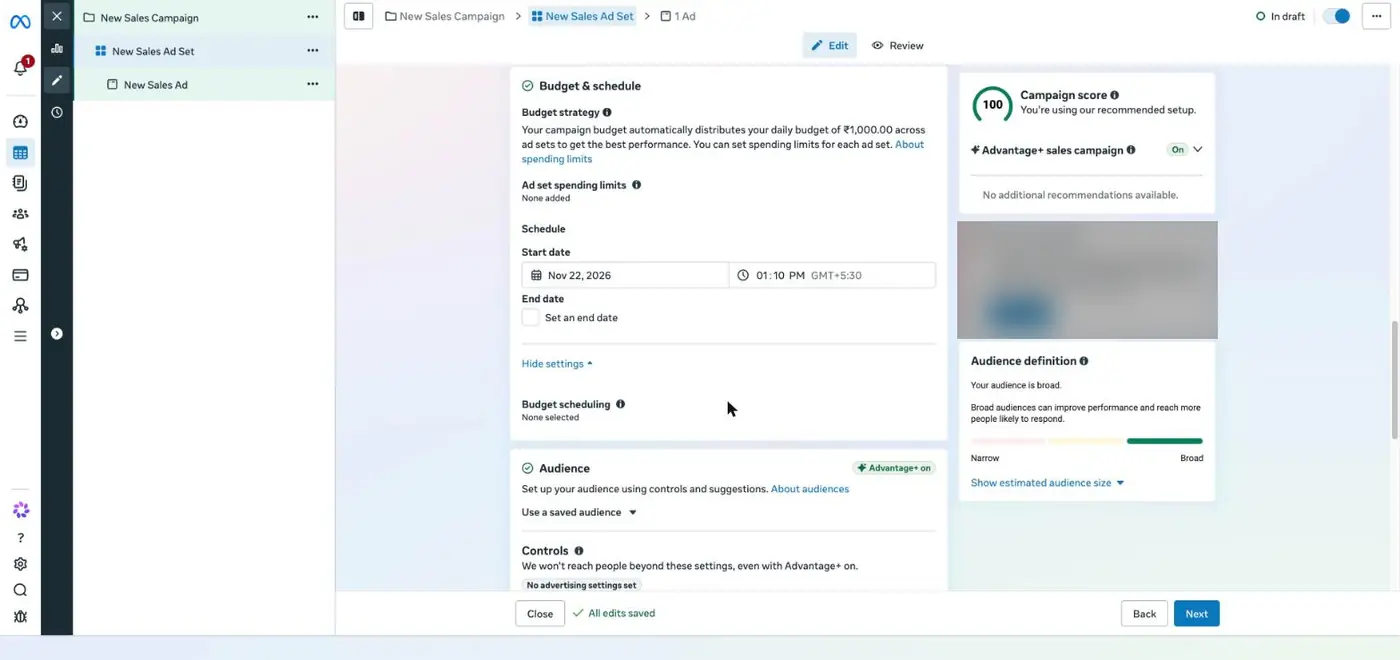
Step 6Ad set level → Budget and schedule
Set a start date you can watch, and a fixed day to stop
123
Budget and schedule
1The campaign budget is shared across the ad sets in it.
2Start date: the morning after your pre-launch checklist in step 11 is complete.
3End date: set one, or write the stop day in your calendar. A test needs a clear end.
Why it mattersYou can only learn from a test that starts clean and ends on a planned day.
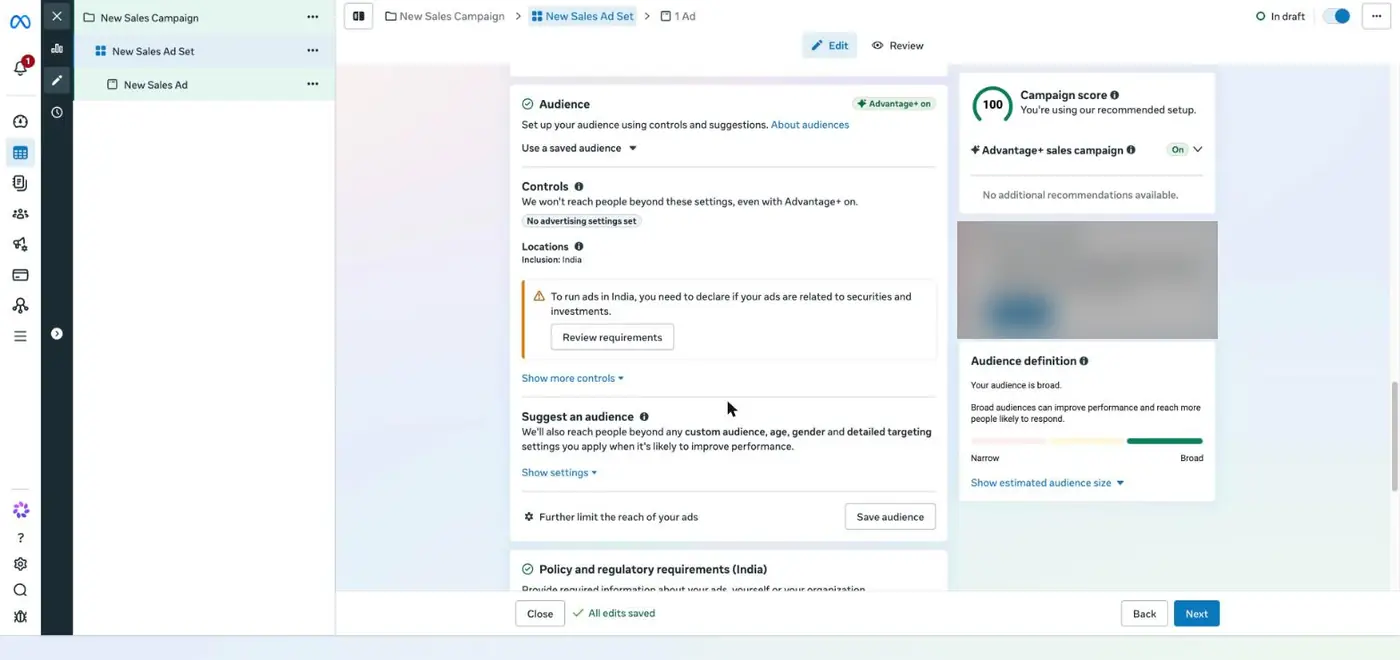
Step 7Ad set level → Audience
Set hard controls first, then give Meta suggestions about your buyer
1234
Audience controls
56
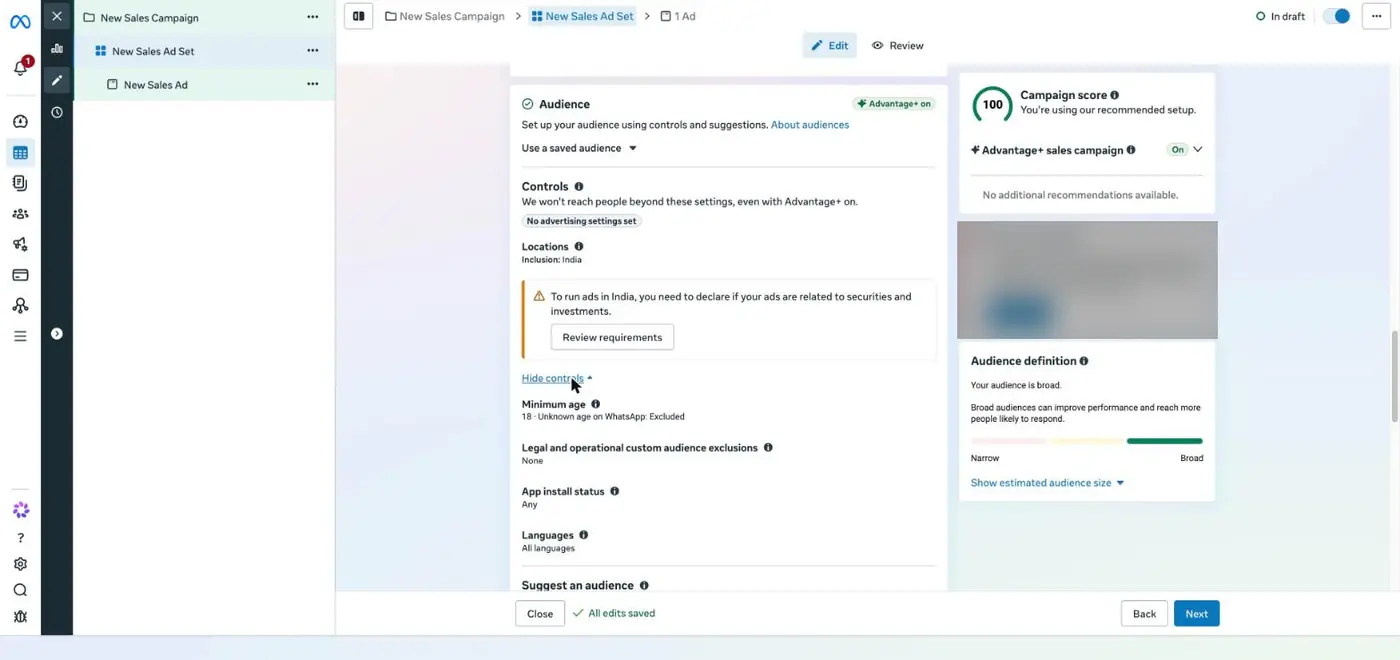
More controls
789
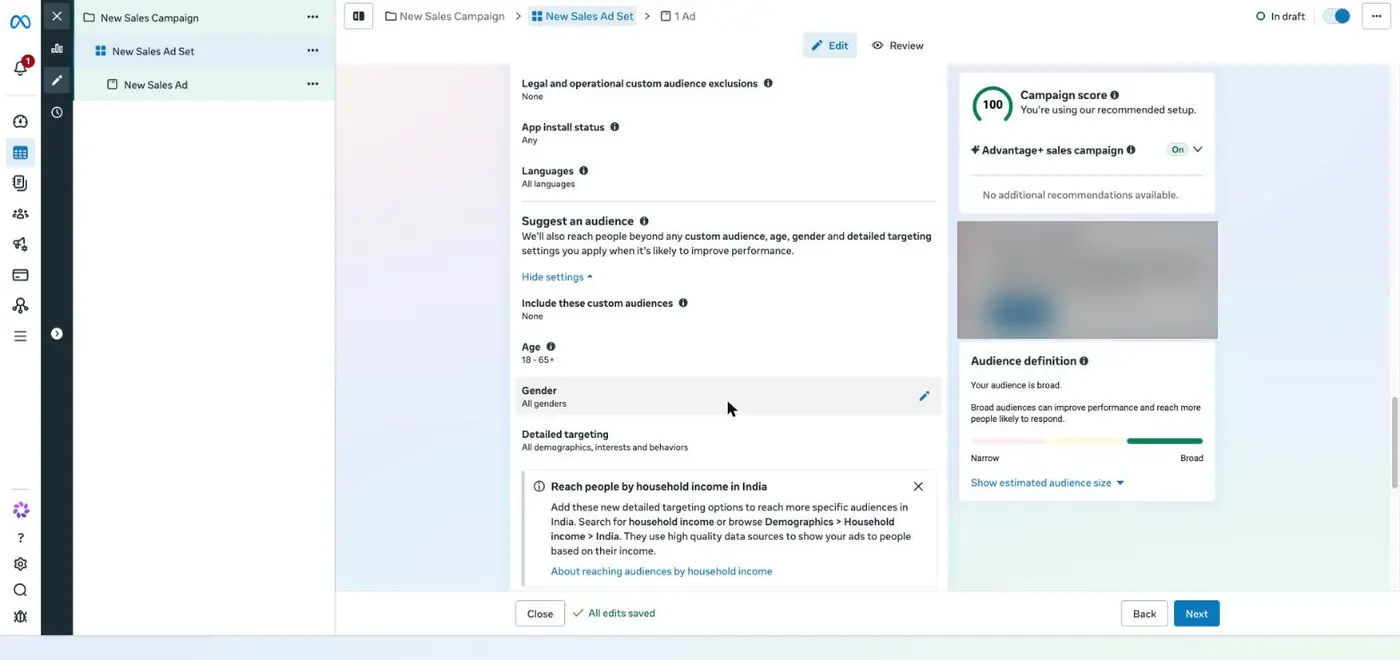
Audience suggestions
10
Your audiences library. Private rows are blurred.
1Advantage+ audience is on: Meta may go beyond your suggestions when it finds buyers.
2Controls are hard limits Meta never crosses.
3Location: India, or only the cities you can deliver to quickly.
4Suggest an audience: soft hints that Meta may go beyond.
5Minimum age is a hard control. Set it to 18.
6Exclusions: once you have buyers, remove them from ads meant for new people.
7Include custom audiences, such as site visitors or your customer list, as a suggestion.
8Age range as a suggestion, for example 18 to 24 for college buyers.
9Detailed targeting: interests and behaviours, as a suggestion.
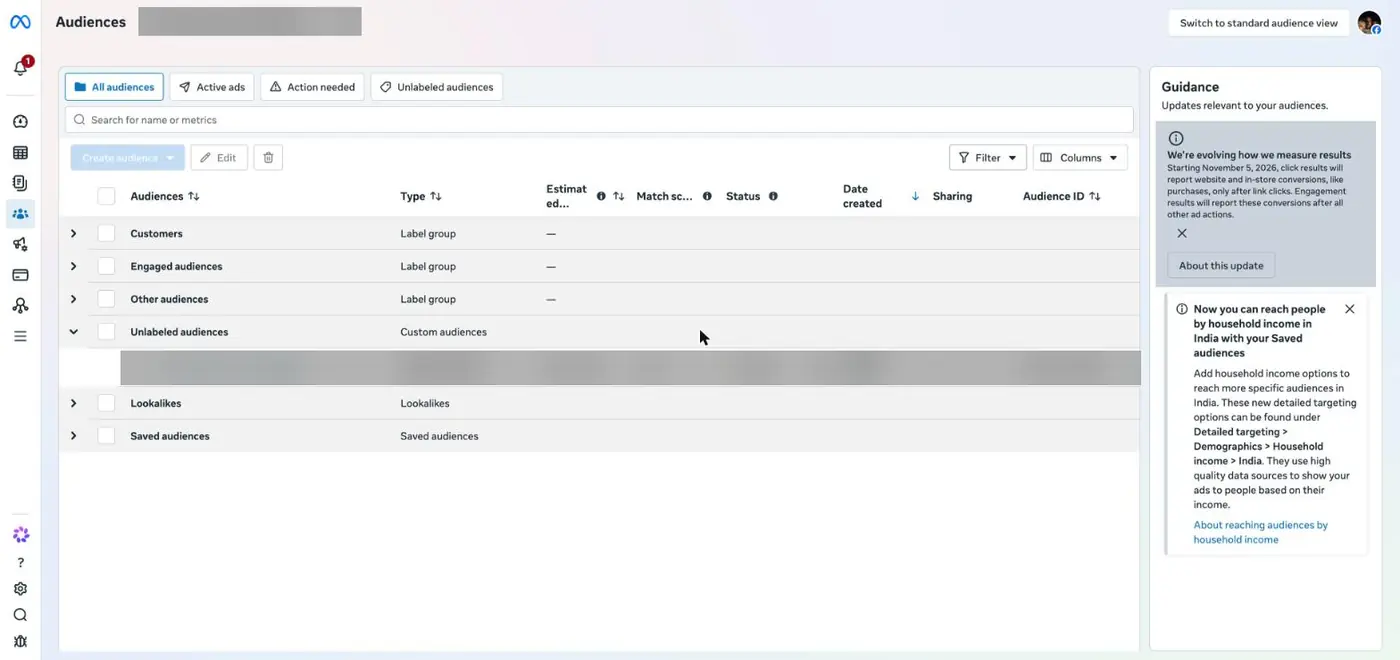
10Saved and custom audiences live in Audiences: customers, engaged people and lookalikes.
Why it mattersThis is Session 3 on screen. Cold people get prospecting, warm people get retargeting and existing customers get retention.
ChatGPT laneFill the [brackets], paste into ChatGPT
Step 8Ad set level → Placements
Leave placements on Advantage+, and make every creative vertical
12
Placements
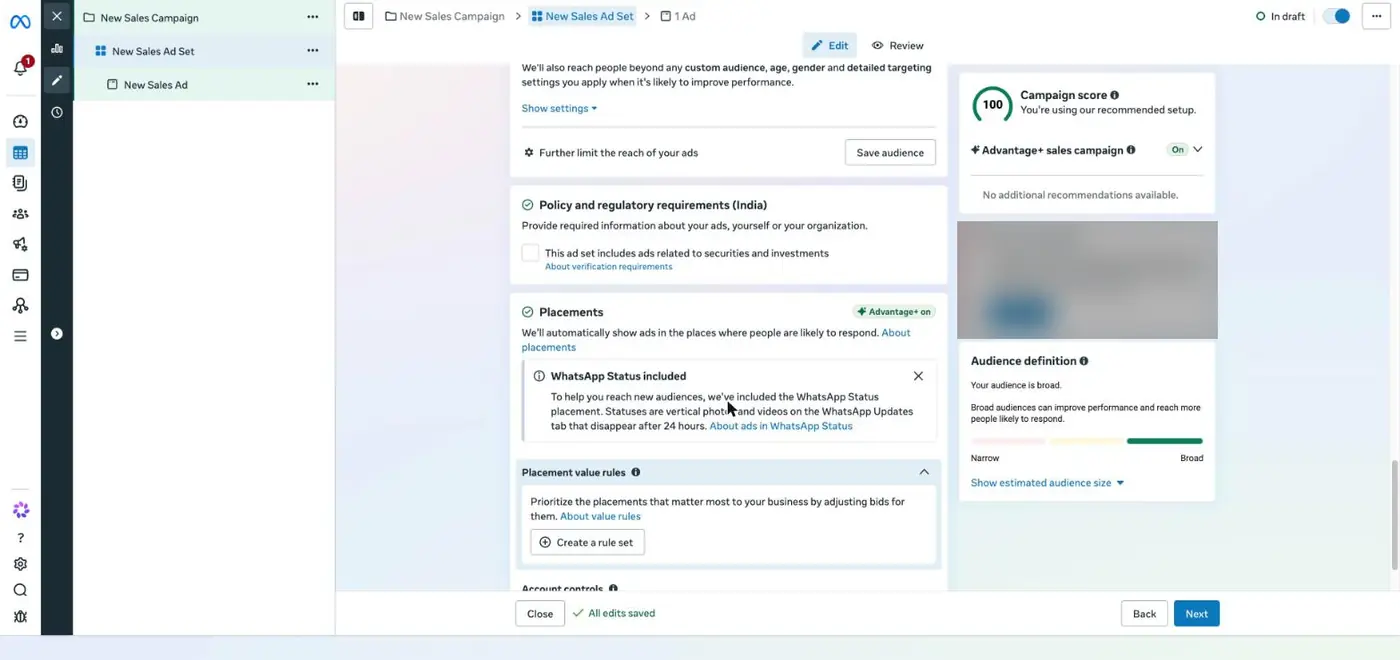
1Advantage+ placements: Meta shows the ad across its apps wherever results cost least.
2WhatsApp Status is now included. Statuses are vertical photos and videos, so design for 9:16.
Why it mattersAt ₹1,000 a day, cutting placements usually raises your cost. Vertical creatives look right in every placement.
Step 9Ad level
Build the ad: identity, format, destination and creative
12
Identity
34
Format
5
Destination
6
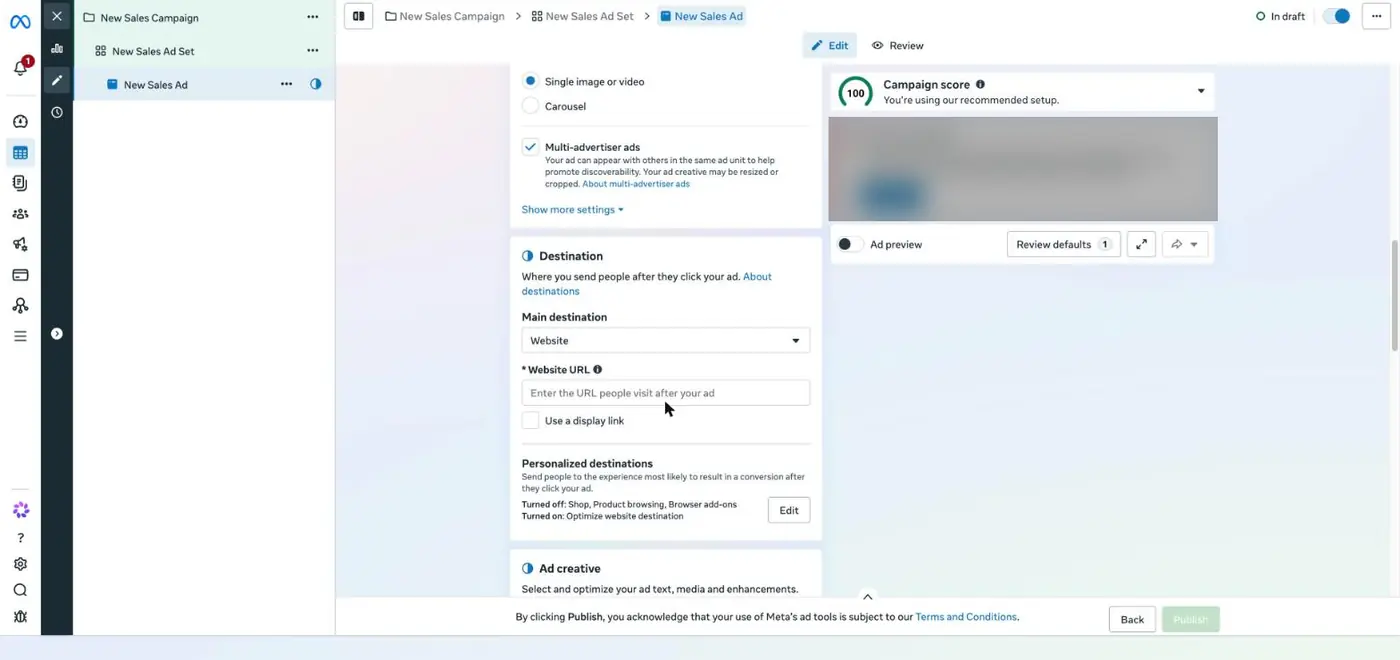
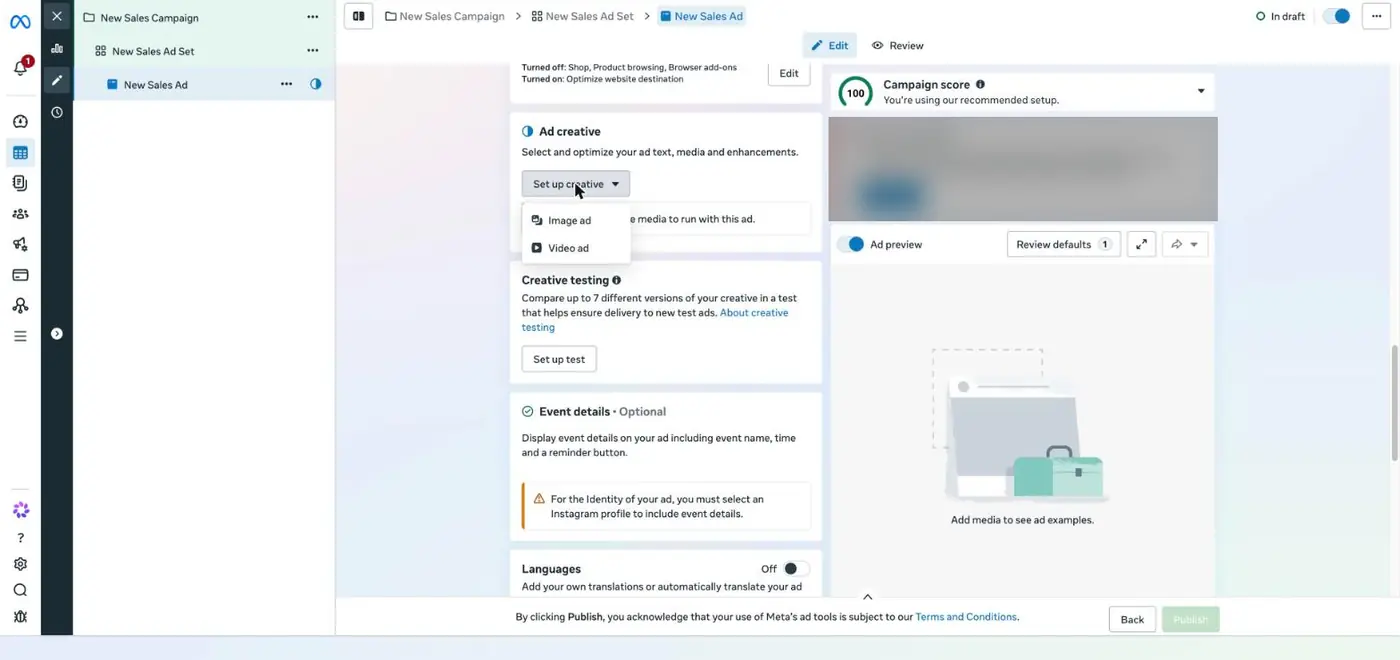
Set up creative
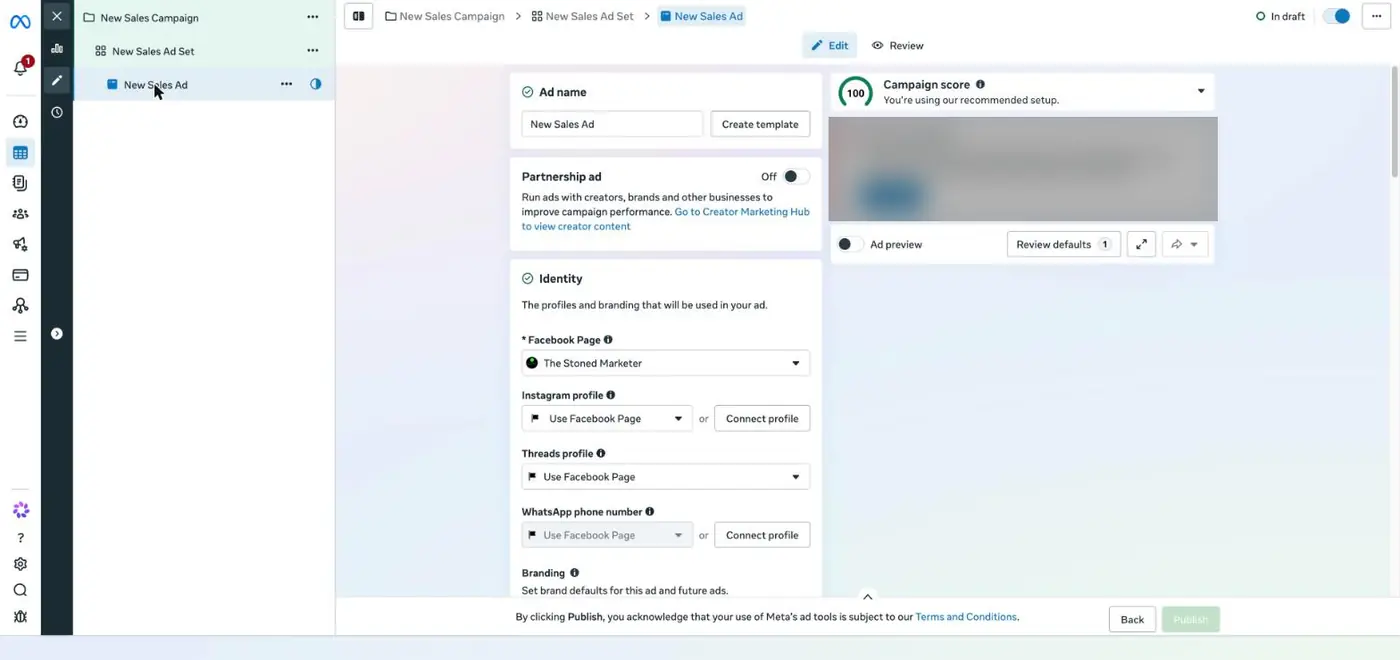
1The Facebook Page that runs the ad.
2Instagram profile: connect the brand account so comments land there.
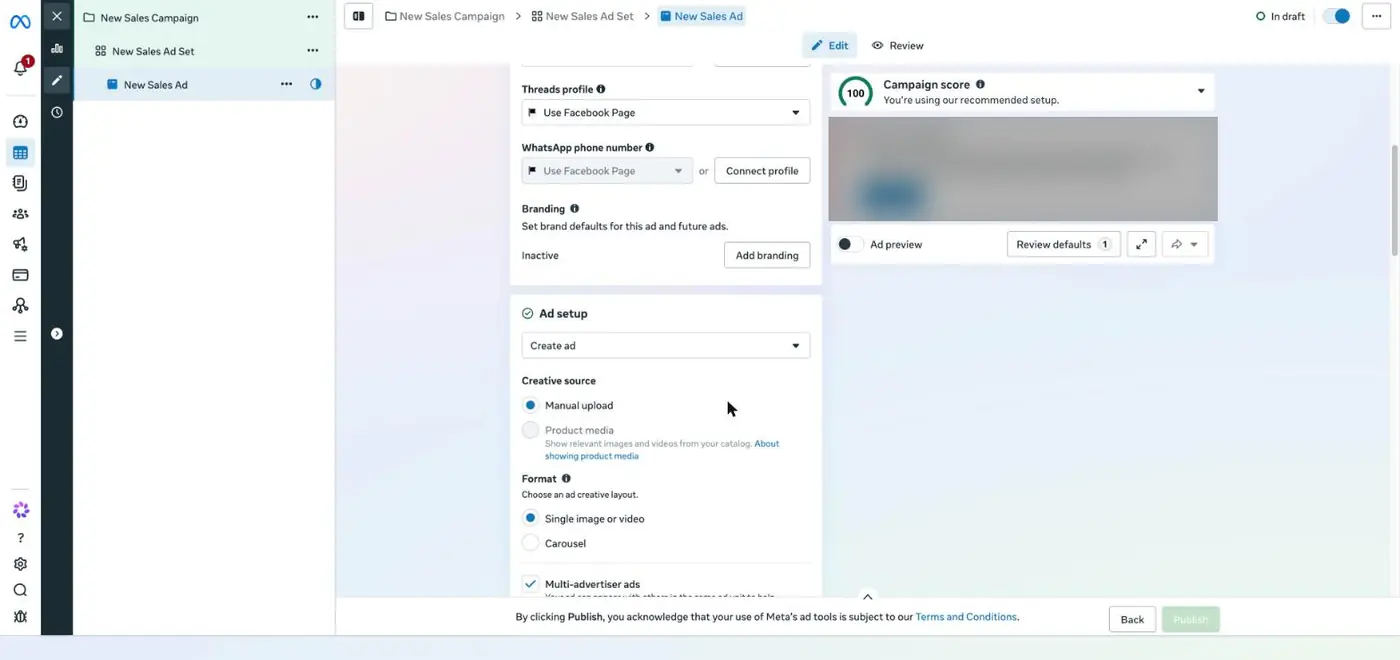
3Single image or video for a reel or a single image.
4Carousel for 3 to 10 cards.
5Website URL: the exact product page, with UTM tags so Shopify can report the source.
6Set up creative: upload the image or video, then write the primary text, headline and call to action.
Change utm_content for each ad, so Shopify tells you which ad brought each order.
Why it mattersOne ad should carry one creative idea. That is how you find out which idea sells.
ChatGPT laneFill the [brackets], paste into ChatGPT
Step 10facebook.com/ads/library · apify.com
Study what already works in your category before you shoot
12345
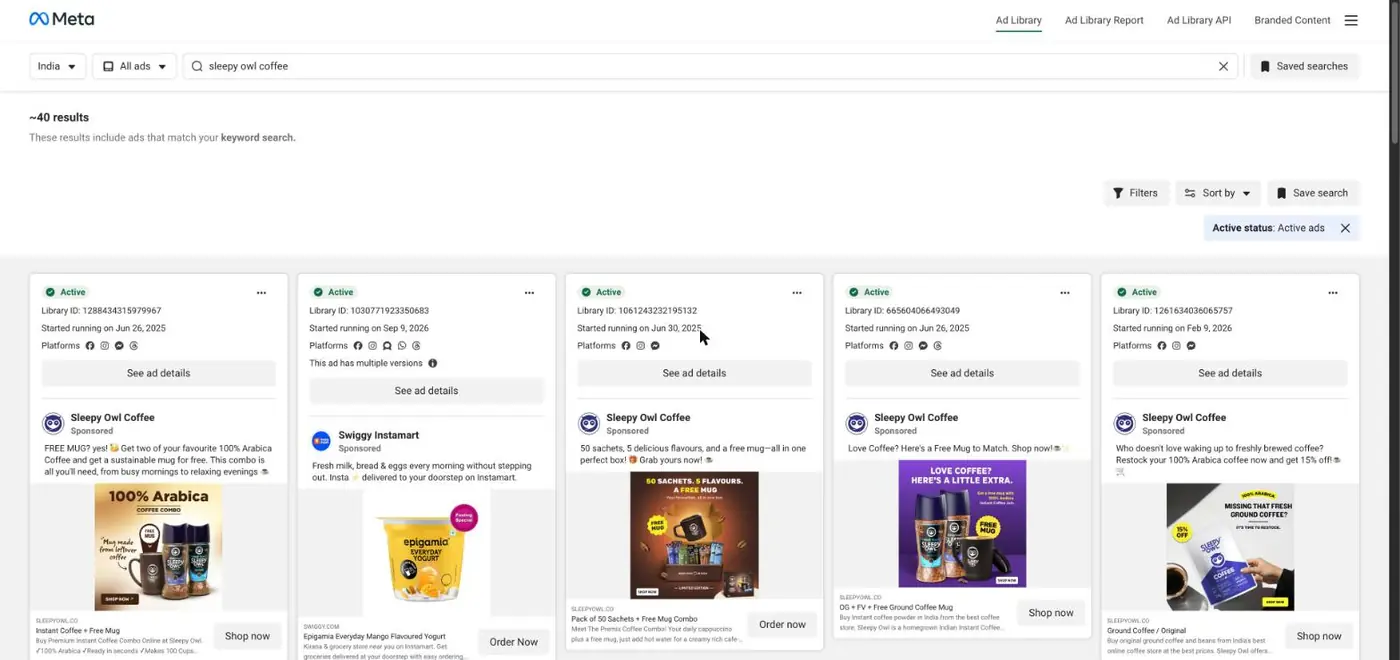
Meta Ad Library: Sleepy Owl's active ads in India, 22 Nov 2026
67
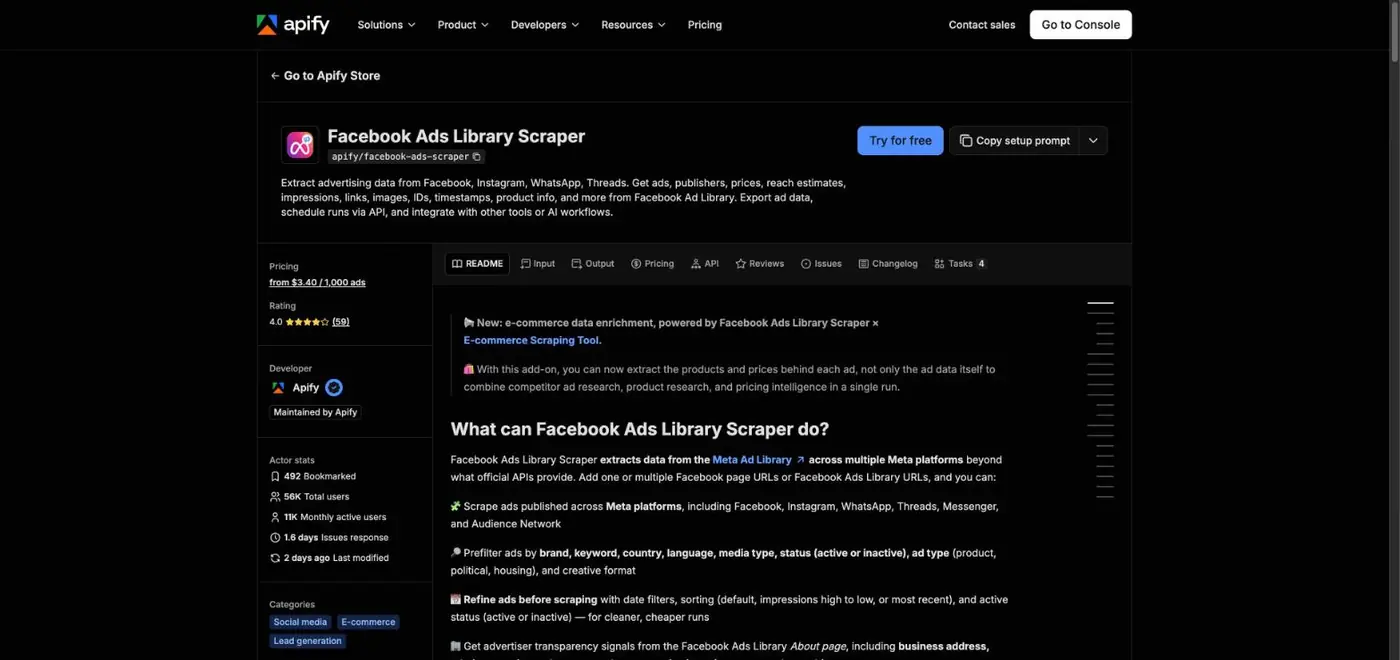
Apify's Facebook Ads Library Scraper
1Meta Ad Library: choose India and type a brand or keyword. It is free.
2Started running: this Sleepy Owl ad began on 26 June 2025 and was still active on 22 November 2026. Brands switch off ads that lose money, so a long run usually means it works.
3Read the copy. Sleepy Owl leads with the offer: a free mug.
4The creative puts the product and the gift together, in large type.
5The call to action.
6To pull hundreds of ads into a spreadsheet, Apify's scraper costs $5.80 per 1,000 ads on the free plan, and the free plan includes $5 of usage a month.
7Try for free, paste an Ad Library search URL, and export the results to Excel.
Why it mattersLong-running competitor ads are free research: the hook, offer and format that already convert in your category.
1 ad set · Website · Purchase · controls: location and minimum age 18 · suggestions: age range and interests · Advantage+ placements
Same audience for every ad, so the ads are compared fairly
Ads
3 ads: reel_a a vertical video, carousel_b 3 to 5 cards, image_c one image with the offer
Three different ideas. The numbers pick the winner
Length
₹3,000 budget: 3 days · ₹5,000 budget: 5 days · Meta's weekly maximum at ₹1,000 a day: ₹7,000
A planned end makes it a test, not a leak
Pre-launch checklist
Creative ideas, hooks and the content DNA breakdown for reels, carousels and single images are in the prompt pack.
Why it mattersA small test only teaches you something if it is structured: one variable per ad, the same audience, the same budget, a fixed end.
Checkpoint: before you move on
Part 4 · Session 6
Read the numbers, decide what to stop, and see how brands scale
Your ads run for a few days on a small budget. This part shows you how to read the results in funnel order, apply three stop, keep and scale rules, why Meta and Shopify disagree, and how a brand grows a winner. The numbers here are from a practice account.
Step 1Ads Manager → Columns → Customise columns
Read your results in funnel order and fix the first broken number
DO THIS
Add these columns in Ads Manager
Columns → Customise columns
Link clicks, CTR (link click-through rate), Landing page views, Adds to cart, Checkouts initiated, Purchases, Cost per purchase
Then: save it as a preset so you never rebuild it.
Practice account · 3 days · ₹3,000 spent
Count
Rate
Impressions
41,000
Link clicks
480
1.17% of impressions (CTR)
Landing page views
372
78% of clicks
Adds to cart
19
5.1% of page views
Checkouts initiated
8
42% of carts
Purchases
4
50% of checkouts
Cost per purchase
₹750
₹3,000 ÷ 4
Revenue and ROAS
₹2,796
4 × ₹699 · ROAS 0.93
Practice numbers, invented for this class. Clicks and page views are healthy here. Only 5 of every 100 visitors add to cart, the same leak Ira had, so the product page gets fixed before the ads are touched.
Where it breaks
What it usually means
What to change first
Few clicks for the impressions
The hook or creative is weak
A new first 3 seconds or a new image
Many clicks, far fewer page views
The page loads slowly or the link is wrong
Compress images, test the link on mobile data
Page views, few adds to cart
Product page, price or offer
Photos, price per unit, delivery promise (Part 2, step 5)
Carts, few checkouts
A cost surprise
Show delivery cost early, or add a free shipping threshold
Checkouts, few purchases
A payment problem
Test UPI and cards, check Razorpay
Why it mattersFixing a later step does nothing while an earlier step is broken. Read top to bottom and stop at the first problem.
Step 2Your break-even from Session 3
Decide to stop, keep or scale with three rules and one calculator
The class rules for a ₹1,000 a day test
Wait for 72 hours or ₹3,000 before judging, unless something is broken: no delivery after 24 hours, a rejected ad or a dead link.
Stop an ad that has spent twice your break-even cost per order with zero purchases.
Keep an ad whose cost per purchase is at or below break-even.
Scale only after 3 days in a row at or below break-even: raise the budget by about 20% every 2 to 3 days.
Change one thing at a time.
These are rules of thumb for this project, not Meta rules.
Break-even cost per order₹0
Your cost per purchase₹0
Why it mattersRules decided before the money is spent stop you from reacting to one good or bad day.
Step 3Ads Manager → Delivery column
Expect "Learning limited" at ₹1,000 a day, and keep your hands off
What Meta says
An ad set generally needs about 50 optimisation events within 7 days of its last significant edit to leave the learning phase. Until then results swing more, and after 7 days without enough events the Delivery column shows Learning limited.
Meta Business Help Centre, as summarised by PPC Land.
What it means at ₹1,000 a day
At a cost per purchase of about ₹400 you get roughly 17 purchases a week, well short of 50. Seeing Learning limited is expected. Judge by your funnel and the class rules, and do not keep editing: a new creative, an audience change, a new optimisation event or a big budget jump restarts learning.
Daily budget needed to reach 50 purchases in 7 days₹0
Why it mattersEvery significant edit sends the ad set back into learning. Small budgets need patience more than tweaks.
Step 4Ads Manager attribution · Shopify Analytics
Pick one source of truth, because Meta and Shopify count the same order differently
Meta counts
A purchase within 7 days after a click or 1 day after a view of the ad, by default. Since 5 November 2026, click results report website purchases only after link clicks.
Shopify counts
The last channel clicked before the order, ignoring direct visits, over 30 days.
One order, two reports
Sana clicks your Reel ad on Monday. On Thursday a friend sends her your product link on WhatsApp, and she buys. Meta counts the sale because she clicked its ad within 7 days. Shopify credits the WhatsApp link, because it was the last click. Both are right by their own rule. Never add them together.
The rule for your project
Shopify orders are your money truth. Use Meta's numbers to compare your ads with each other. UTM tags connect the two.
Why it mattersAdding Meta's purchases to Shopify's orders counts the same sale twice.
Step 5Practice numbers for Dark Hour
See how a brand scales a winner, in a practice ad account
Week
Move
Daily budget
Cost per purchase
Decision
1 · Test
3 ads, one ad set
₹1,000
reel_a ₹380 · carousel_b ₹460 · image_c none after ₹900
Stop image_c (₹900 is more than twice the ₹413 break-even). Keep reel_a.
2 · Vertical
More budget on the proven ad
₹1,000 → ₹1,200 → ₹1,440
₹395
About 20% every 3 days while cost stays under break-even
3 · Horizontal
A new ad set with a lookalike of buyers, a retargeting ad set for 14-day site visitors at about 15% of budget, and three new hooks on the winning angle
₹1,700
₹370 blended
New audiences and fresh creatives before the winner tires
4 · Retention
WhatsApp reminder to buyers around day 18, a bigger pack offered only to existing customers
₹2,000
Falls as repeat orders arrive
Session 2: the first order pays for the ad, repeat orders pay you
Practice numbers for Dark Hour, invented for this class. Break-even here is ₹699 minus ₹270 of costs minus a 2.36% payment fee, about ₹413.
Why it mattersScaling is a sequence of small, controlled steps: more budget for a proven ad, new audiences, then bringing buyers back.
Step 6Your final project submission
Send a one-page report that shows your thinking, not only your numbers
What your one page contains
What you sold, to whom, at what price, and your store link
The three ads, with the idea behind each
Total spend and the funnel from impressions to purchases, with the rate at each step
Cost per purchase against your break-even
What you stopped, what you kept, and why
One thing you learned about your buyer
What you would do with ₹50,000 next month
Why it mattersA clear report is what a founder or an agency lead reads. It shows you can turn data into a decision.
ChatGPT laneFill the [brackets], paste into ChatGPT
Checkpoint: before you move on
Help desk
Stuck at home? Find your doubt, then open the ready prompt
Every common question from the project has a section in the prompt pack: what to give the AI, the prompt to copy, the tools to connect, and an example of what you get back.
 12